SaveToSharePoint - InfoPath Dev
in

InfoPath Dev

SaveToSharePoint

Last post 02-13-2011 07:08 AM by Mel Clemente. 3 replies.
Page 1 of 1 (4 items)
Sort Posts: Previous Next
  • 02-01-2011 08:19 PM

    SaveToSharePoint

    Hiya, we are just in trial at the moment, but everything is looking great thus far..

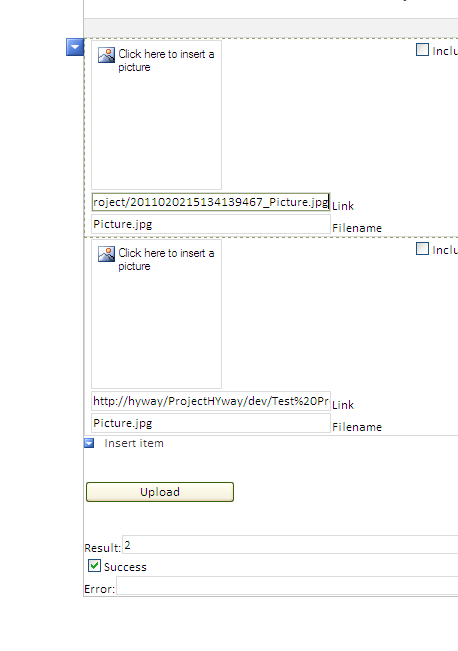
     I'm running through the tute on how to do up a form that saves off images to a sharepoint library.. yep great works well.. Next phase same form but as a repeating table ..

    Everything worked but what happened is the filename of the secord file was the same as the first file.. All the added numbers still allowed them to be unquie though.. eg file 1 = picture.jpg   file 2 = sunrise.jpg     after execute filename 1 = picture.jpg   filename 2 = picture.jpg  


    I guess it will be something simple, but I just can't put my finger on it...

  • 02-02-2011 09:23 AM In reply to

    Hi --

    After a file in attached in an image picker, the name is no longer present in the base 64 stored in qRules. If you attach with a file picker, you'll maintain the name. Due to this InfoPath limitation, all images attached via image picker end up named "Picture".

    So, you aren't doing anything wrong -- this is, however, the expected behavior with qRules.

    Hilary Stoupa

  • 02-04-2011 12:35 PM In reply to

    Hi BaldCat,

    Let us know if File Picker is a satisfactory workaround. After attaching and converting to a link, you should be able to still show the picture in the view by using a Picture control bound to the link. :)

    Patrick Halstead
    Project Manager at Qdabra
  • 02-13-2011 07:08 AM In reply to

    Updating the thread as this issue has been resolved. Please let us know if you need further assistance with your evaluation and we'd be happy to help.
    Mel Clemente
    Qdabra® Software/ InfoPathDev.com
    The InfoPath Experts – Streamline data gathering to turn process into knowledge.™

Page 1 of 1 (4 items)
Copyright © 2003-2019 Qdabra Software. All rights reserved.
View our Terms of Use.