Hi All,
I am quite new to infopath. Now, I developing infopath form for status report. This report is mainly used for our organization employees to give their feed back of their tasks. I well designed the form and get connections for required areas and it was published successfully. Now employee can use the form and submit the form succesfully.
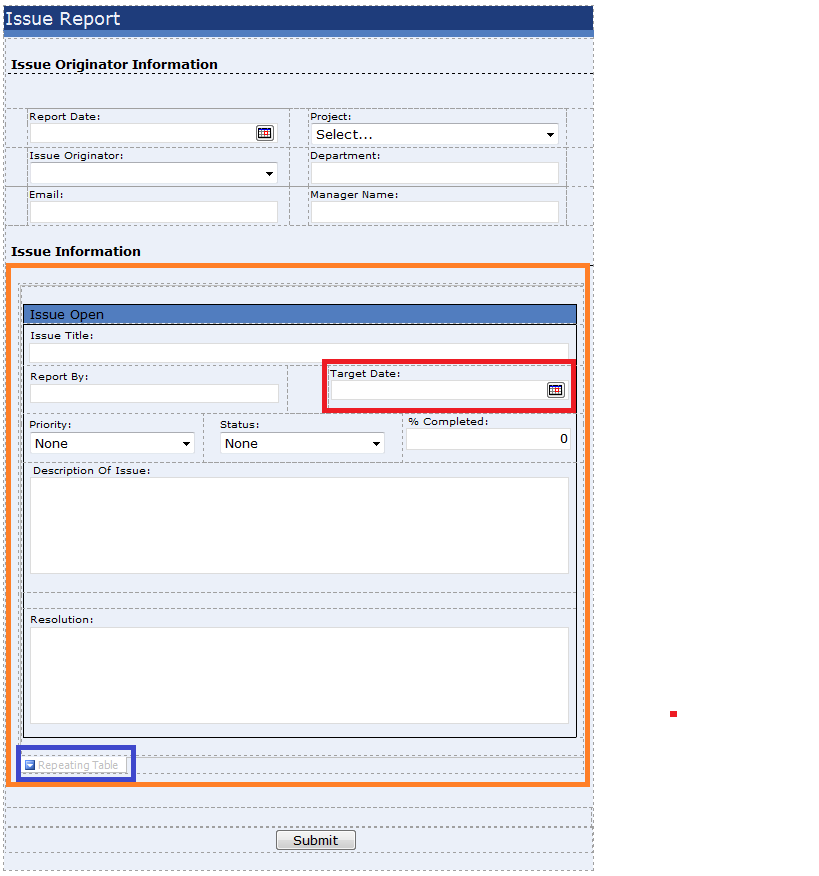
Issue : When employee required to give his status repoprt to highter authority. He needs to fill form the information finally submit the form . After submission of the form automatically workflow will start. Inside form I have target date( find in the image in attachemt). I want to use this target date as reminder to the employee to know his target date and employee will receive an alert prior to the target date . This is done by workflow. Upto this everything is ok but
If the employee enter more than one task , each task as separate target date then I can only read first task information and send email alert fist target date rest cannot be done. If I am not wrong this is because of repeating table. Repeating table always referring to the fist target date even I got more tasks and target dates.
So, Can anyone help me how to do this? If my design was wrong then suggest me to do this in proper way.
Thanks & regards,