rules for is after and is before - InfoPath Dev
in

InfoPath Dev

rules for is after and is before

Last post 10-04-2010 12:03 PM by David De mari. 4 replies.
Page 1 of 1 (5 items)
Sort Posts: Previous Next
  • 10-02-2010 04:42 AM

    rules for is after and is before

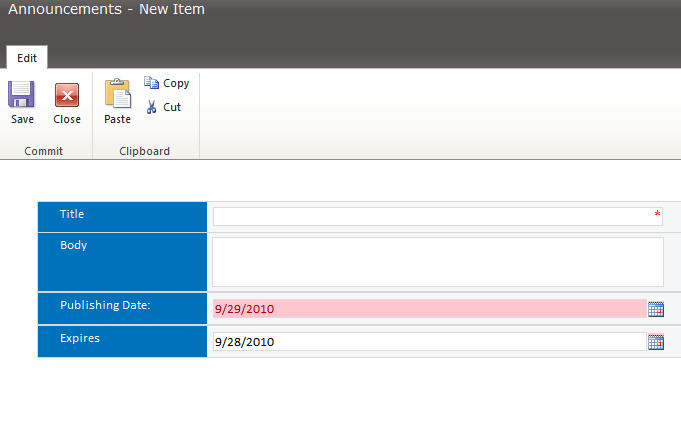
    when i make a rule for 2 date fields using is after and is before, i want to color the specific date fields to be colored red in case the first date is greater than the second date, so i want to color both. i make the rule in both fields like i use with conditional formatting, but the problem is the field that gets first in the form order is the one that has the validation, i mean if i have first date, and below it second date, and then make first date greater than second date, only first date will have a red color because it came before the second date in the design, if i change the order in the design, the second date will have the red color, how can i apply the red color to be on the two fields????


    thanks a lot.

  • 10-02-2010 05:15 AM In reply to

    Re: rules for is after and is before

    and this is how it looks after changing the location of datepicker, only one formatting occures on the list.


  • 10-04-2010 08:59 AM In reply to

    Re: rules for is after and is before

    any idea ?

  • 10-04-2010 09:35 AM In reply to

    Re: rules for is after and is before

    Would you mind attaching a copy of your form so that we can look at it?

    Jimmy Rishe / Software Developer / Microsoft MVP
    Qdabra Software
  • 10-04-2010 12:03 PM In reply to

    Re: rules for is after and is before

    they are not forms, am trying to edit list in sharepoint so that expire date is not less than publish date, i make the validation on both of the fields so both of them are colored red when the validation is fired, but then i have this case... so you can try it on a list in sharepoint

Page 1 of 1 (5 items)
Copyright © 2003-2019 Qdabra Software. All rights reserved.
View our Terms of Use.