Copy Table syntax - InfoPath Dev
in

InfoPath Dev

Copy Table syntax

Last post 06-02-2010 12:53 PM by Hilary Stoupa. 12 replies.
Page 1 of 1 (13 items)
Sort Posts: Previous Next
  • 05-27-2010 06:43 AM

    Copy Table syntax

    Here is the xpath for my source (sp list) and destination: 

    Source xpath:    /dfs:myFields/dfs:dataFields/ns2:GetListItemsStrResponse/ns2:GetListItemsStrResult/Rows/row

    Destination xpath:     /my:Tasks/my:Task

    Is this the proper syntax for Copy Table? 

    CopyTable /dsnamesrc=GetListItemsStr /tablesrc=/dfs:myFields/dfs:dataFields /rowsrc=dfs:Rows /tabledest=/my:Tasks /rowdest=my:Task /empty

  • 05-27-2010 07:06 AM In reply to

    Hi Marzipan,

    I believe that the /tablesrc parameter might be incorrect. I'm thinking it should be /dfs:myFields/dfs:dataFields/ns2:GetListItemsStrResponse/ns2:GetListItemsStrResult/Rows (which is the container) and then /rowsrc is the repeating field row.

    As you create your command, you can display the qRules error node in the view, and this will provide you with information about the correct syntax, invalid parameters, errors encountered, etc.

    Ernesto Machado
    Qdabra® Software/ InfoPathDev.com
    The InfoPath Experts – Streamline data gathering to turn process into knowledge.™


  • 05-27-2010 08:58 AM In reply to

    Still getting error: An error has occurred executing the rule. Failed to select the source row to copy from.

    CopyTable /dsnamesrc=GetListItemsStr /tablesrc=/dfs:myFields/dfs:dataFields/ns2:GetListItemsStrResponse/ns2:GetListItemsStrResult/Rows /rowsrc=dfs:row /tabledest=/my:Tasks /rowdest=my:Task /empty

  • 05-27-2010 09:10 AM In reply to

    This

    /rowsrc=dfs:row

    Should probably be

    /rowsrc=row

    Can you try that out? Thanks!

    Ernesto Machado
    Qdabra® Software/ InfoPathDev.com
    The InfoPath Experts – Streamline data gathering to turn process into knowledge.™


  • 05-27-2010 10:07 AM In reply to

    Now it looks like the destination syntax is incorrect. 

    An error has occurred executing the rule. Failed to select the destination row to copy to.

  • 05-27-2010 10:40 AM In reply to

    looking back over "Copy SharePoint List Data to Main Data Source" it looks like I need to create the Main fields as attributes.  I'm trying that now.

  • 05-27-2010 10:43 AM In reply to

    The destination needs to match the source. So if the source is attributes, the destination must be attributes as well.

    /tabledest= is the container group and /rowdest= needs to point to the repeating node.

    Ernesto Machado
    Qdabra® Software/ InfoPathDev.com
    The InfoPath Experts – Streamline data gathering to turn process into knowledge.™


  • 05-27-2010 11:09 AM In reply to

    Since the source is elements, I changed the destination back to elements.

    Still getting: An error has occurred executing the rule. Failed to select the destination row to copy to.

    CopyTable /dsnamesrc=GetListItemsStr /tablesrc=/dfs:myFields/dfs:dataFields/ns2:GetListItemsStrResponse/ns2:GetListItemsStrResult/Rows /rowsrc=row /tabledest=/my:Tasks /rowdest=my:Task /empty

    I attached my form.

  • 05-27-2010 11:55 AM In reply to

    Can you give /empty a value? (/empty=yes) Though the error points elsewhere, I want to rule that out as the issue.

    Thanks!

    Ernesto Machado
    Qdabra® Software/ InfoPathDev.com
    The InfoPath Experts – Streamline data gathering to turn process into knowledge.™


  • 05-27-2010 12:45 PM In reply to

    I added the "yes" value, new error.

     An error has occurred executing the rule. Failed to add copied rows to destination table.

  • 05-27-2010 02:04 PM In reply to

    Hi Marzipan,

    Please create another group to hold your Task repeating group, something similar to this:
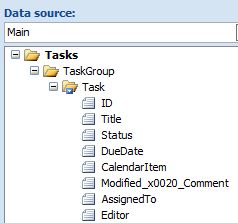
     

    So under the Tasks root node, add a new group (in this case I called it 'TaskGroup) and then move your Task repeating group inside it. Your command should then be:

    CopyTable /dsnamesrc=GetListItemsStr /tablesrc=/dfs:myFields/dfs:dataFields/ns2:GetListItemsStrResponse/ns2:GetListItemsStrResult/Rows /rowsrc=row /tabledest=/my:Tasks/my:TaskGroup /rowdest=my:Task /empty=yes

    That should hopefully resolve the issue. Please let us know otherwise.

    Mel Clemente
    Qdabra® Software/ InfoPathDev.com
    The InfoPath Experts – Streamline data gathering to turn process into knowledge.™

    Filed under:
  • 05-28-2010 06:07 AM In reply to

    That worked! 

     Now can you explain why?

  • 06-02-2010 12:53 PM In reply to

    The CopyTable command requires that the destination node is the only child of its parent node. In general, this is the optimal way to structure your XML, so it encourages best practices.

    We need to update our documentation to highlight this, however. Thanks for bringing it to our attention!

    Hilary Stoupa

Page 1 of 1 (13 items)
Copyright © 2003-2019 Qdabra Software. All rights reserved.
View our Terms of Use.