Populating fields in subsequent sections of a repeating section - InfoPath Dev
in

InfoPath Dev

Populating fields in subsequent sections of a repeating section

Last post 04-19-2010 06:06 AM by newbie999. 7 replies.
Page 1 of 1 (8 items)
Sort Posts: Previous Next
  • 04-01-2010 06:44 AM

    Populating fields in subsequent sections of a repeating section

    I am creating a form as follows.  I have a "outer" repeating section in which the user enters a work item and then selects as many names as he/she wishes from a drop down list.  When the user clicks a button (also in this "outer" repeating section), Feedback textboxes are added for each name selected, as well as text boxes with the names selected from the drop down appear above the those provided for feedback.  I used the Clone method to create the new feedback textboxes and textboxes that display the user's name that was selected. (The username textbox appears above the respective feedback textbox).  This did the trick, but there is a problem.  The user should be able to click "Insert item" on the outer repeating section to add another work item wherein he/she may again select as many names as they wish, click a button, and have feedback and user name text boxes appear for each name selected from the drop down box associated with the *current* work item, (i.e, "outer" repeating section).  I clicked Insert Item on the "outer" repeating section and selected 2 names from the second drop down, but when I try to clone a node, it is added at the end of the *previous* repeating section.  I don't know how to navigate into (for lack of a better term) subsequent repeating sections.

    I saw the following links, but they were for tables.  Also, I am rather new to Infopath and was not sure how to proceed.

     http://www.infopathdev.com/forums/p/9316/33499.aspx#33499

     and

    http://www.infopathdev.com/forums/p/11859/41670.aspx


  • 04-07-2010 03:08 PM In reply to

    Re: Populating fields in subsequent sections of a repeating section

    Hi -- you are doing this via code? Post your code sample, and that will help us help you better....

    Hilary Stoupa

  • 04-08-2010 11:32 AM In reply to

    Re: Populating fields in subsequent sections of a repeating section

    Thank you for your reply.  Here is my code, I am using InfoPath 2007:


    public void addTesters_Clicked(object sender, ClickedEventArgs e)

    {

    GetTesterList(); //Goes through XML nodes and adds names from drop down to List<string>

    XPathNavigator newNode = null;

    XPathNavigator root = this.MainDataSource.CreateNavigator();

    XPathNavigator group = root.SelectSingleNode("/my:myFields/my:group3/my:group4/my:group9", NamespaceManager);

    XPathNavigator field = root.SelectSingleNode("/my:myFields/my:group3/my:group4/my:group9/my:group10", NamespaceManager); //Contains textboxes for tester and feedback

    XPathNodeIterator innerTesterIter = root.Select("/my:myFields/my:group3/my:group4/my:group9/my:group10/my:tester", NamespaceManager);  //Textbox for tester's name


    for (int i = 0; i < Testers.Count - 1; i++)

    {

    newNode = field.Clone();

    if (newNode.MoveToAttribute("nil", "")) //It was recommended to this if there were schema errors. I don't think this evalutates to true

    {

    newNode.DeleteSelf();

    }

    group.AppendChild(newNode); //*** Always adds nodes to first outer section

    }

    foreach (string tester in Testers)

    {

    if (InnerTesterCurrentPosition == 0)

    {

    innerTesterIter.MoveNext();

    }

    else

    {

    while (innerTesterIter.CurrentPosition <= InnerTesterCurrentPosition)

    {

    innerTesterIter.MoveNext();

    }

    }

    InnerTesterCurrentPosition = innerTesterIter.CurrentPosition;

    innerTesterIter.Current.SetValue(tester); //Put tester's name in "tester" textbox in "inner" section

    }


    }

  • 04-15-2010 11:46 AM In reply to

    Re: Populating fields in subsequent sections of a repeating section

    Can you post a screen shot of your schema? I'm trying to understand what is repeating and what isn't (by the way, it is a good idea to always rename your groups and fields so that they have meaningful names -- it makes everything so much easier!).

    When you select the node for the variable you are calling "group", you are always selecting the first one, if group 9 is repeating. If you need to loop through a list of group 9's, you need to use and XPathNodeIterator. Then you would use something like this, if group 10 was also repeating -- again without seeing your data structure, I'm making lots of guesses:

     
            XPathNodeIterator group = root.Select("/my:myFields/my:group3/my:group4/my:group9", NamespaceManager);
     
            foreach (XPathNavigator row in group)
            {
                XPathNodeIterator innerGroup = group.Select("my:group10"), NamespaceManager);
     
                foreach (XPathNavigator innerRow in innerGroup)
                {
                    XPathNavigator field = innerGroup.SelectSingleNode("my:tester");
                    field.SetValue("Happy Tester");
                }
            }
    Hilary Stoupa

  • 04-16-2010 01:08 PM In reply to

    Re: Populating fields in subsequent sections of a repeating section


  • 04-16-2010 01:16 PM In reply to

    Re: Populating fields in subsequent sections of a repeating section

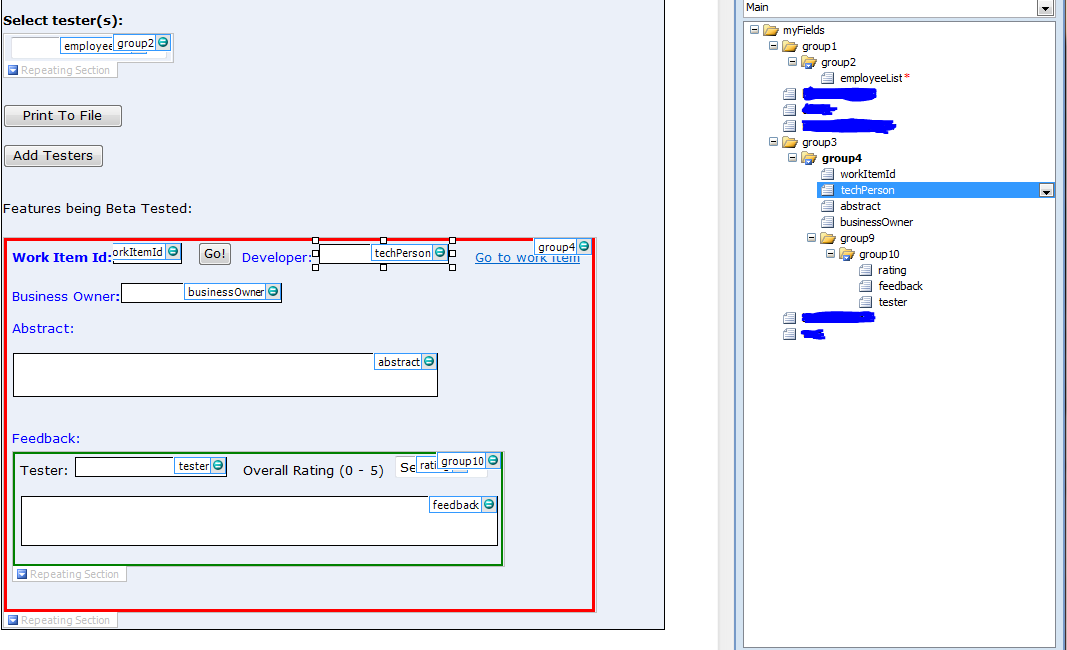
    Thanks for the response, I have attached the schema as requested and also the main form. 

    To clarify, here is the behaviour I am seeing:

    The user enters a workItemId (say 1234) in the workItemId textbox in the first "outer" repeating section.  The user then selects a number of testers from the employeeList drop down (say 5 testers are chosen) and clicks Add Testers.  This causes 5 "inner" repeating sections (green rectangles) to be generated inside the "outer" repeating group (red rectangle).  Also, the "Tester" textbox in each generated section contains a name the user selected.  This works fine for the very first workItemId entered.  That is, the correct number of "inner" repeating sections are generated (i.e. one for each name the user chose from the drop down list) and the respective "Tester" textbox contains the name of a tester.

    However, when the user clicks to add a subsequent "outer" repeating section (red rectangle) for another workItemId, (say 5678), and the user clicks Add Testers, all the names (but one) are added to the first "outer" repeating section, which is associated with workItemId 1234.

    I would like the 5 testers' names to show up in the "outer" section (red rectangle) for workItemId 5678, just as they did for workItemId 1234.

    I hope my description and screenshots have helped to better explain the problem.  Thank you for your help. 


  • 04-17-2010 04:43 AM In reply to

    Re: Populating fields in subsequent sections of a repeating section

    Hi:

    First, move your "Add Testers" button into your repeating section that you have outlined in red.

    With this line: XPathNavigator group = root.SelectSingleNode("/my:myFields/my:group3/my:group4/my:group9", NamespaceManager); you are always selecting the first the group9 group. That is why your testers are being added to the first group.

    If you move your button, you can use:

    XPathNavigator workItem = e.Source;

    This will get you the correct group4 for the red outlined section. From there, you can select group9 for your AppendChild operation, like this:

    XPathNavigator testers =  workItem.SelectSingleNode("my:group9", NamespaceManager);

    Running your code in debug will help you see what might be going on -- here's a blog post on that, if you are unsure of how to do it.

    Hilary Stoupa

  • 04-19-2010 06:06 AM In reply to

    Re: Populating fields in subsequent sections of a repeating section

    That did the trick!   Thank you so much for all of your help.

Page 1 of 1 (8 items)
Copyright © 2003-2019 Qdabra Software. All rights reserved.
View our Terms of Use.