DBXL mapping error - InfoPath Dev
in

InfoPath Dev

DBXL mapping error

Last post 03-10-2010 08:03 AM by Jim Cantwell. 10 replies.
Page 1 of 1 (11 items)
Sort Posts: Previous Next
  • 03-04-2010 02:36 AM

    • orion
    • Not Ranked
    • Joined on 11-10-2009
    • Posts 7
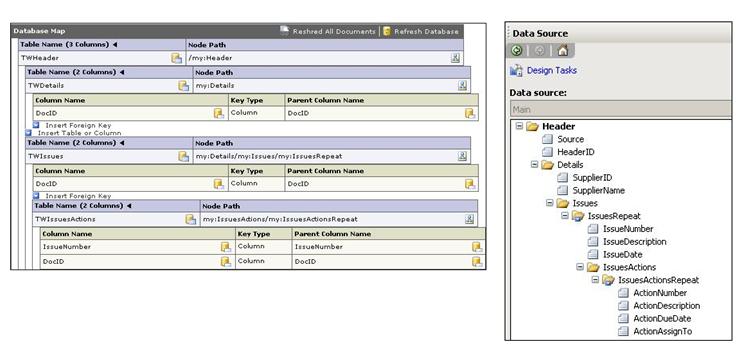
    Hi, I'm trying to complete my database map in DBXL but am getting an error after I add a mapping for one of my repeating tables. I have attached screenprints of my database map and my data source.
    With the tables TWHeader, TWDetails and TWIssues the mapping is ok and all the tables are updated. As soon as I add TWIssuesActions and try to ReShred I get the error:
    An error occurred while calling the ReshredAllDocuments method. ID501: Error parsing 1 documents out of 1. Error Shredding DocId 111: Error inserting a new record into the DB Check mapping for foreign keys on object TWIssues, and Node my:IssuesActionsRepeat.
    This is the first mapping I have done so I'm probably making a very silly mistake, I hope someone can help.
    Thanks.
  • 03-04-2010 05:21 AM In reply to

    Hi orion,

    I'm sorry that you're having issues. The problem might be that you have two keys set for the grandchild table (TWIssuesActions). You need just one key between the tables TWIssues and TWIssuesActions. Can you try that and let us know how it goes? Thanks.

    Ernesto Machado
    Qdabra® Software/ InfoPathDev.com
    The InfoPath Experts – Streamline data gathering to turn process into knowledge.™


  • 03-04-2010 06:43 AM In reply to

    • orion
    • Not Ranked
    • Joined on 11-10-2009
    • Posts 7

    Hi Ernesto and thanks for your reply.

    I changed the foreign key to be just IssueNumber and moved DocID into the list of columns and populated it there and it all works ok now.

    Is it not possible then to have more than one foreign key. It's just that the 2 tables link by DocID and IssueNumber, they are the unique key on TWIssues, and it seemed the right place to map those 2 columns.

    Thanks.

  • 03-04-2010 07:54 AM In reply to

    It might be possible to have two foreign keys defined in the database mapping (in DAT) but perhaps we need to look at your table in SQL too. What is defined as a Foreign Key in the table? What is defined as a Primary Key? Thanks for the additional info.

    Ernesto Machado
    Qdabra® Software/ InfoPathDev.com
    The InfoPath Experts – Streamline data gathering to turn process into knowledge.™


  • 03-04-2010 09:05 AM In reply to

    • orion
    • Not Ranked
    • Joined on 11-10-2009
    • Posts 7

    TWIssues had DocId and IssueNumber as the primary key. TWIssuesActions has DocID, IssueNumber and ActionNumber as the primary key. I have defined no relationships between the tables in sql.

  • 03-04-2010 02:35 PM In reply to

    Great, thanks for the additional information. We'll see if we can reproduce the issue.

    Hilary Stoupa

  • 03-07-2010 07:37 AM In reply to

    Hello, and thanks for your patience. I have been able to recreate this scenario, and it works, so we need to investigate why it's not working for you. I'm attaching a screenshot will all my setup; perhaps it'll help you out as you compare to your setup.

    Also: Why is TWDetails necessary as a separate table? Because there is no repeating group under Details, there is a 1 to 1 relationship between the data in TWDetails and TWHeader. I believe the data in TWDetails can just be added as columns in TWHeader. That's why I did in my environment, but let me know if this is not acceptable.


    Ernesto Machado
    Qdabra® Software/ InfoPathDev.com
    The InfoPath Experts – Streamline data gathering to turn process into knowledge.™


  • 03-08-2010 03:08 AM In reply to

    • orion
    • Not Ranked
    • Joined on 11-10-2009
    • Posts 7

    Hi, you're right, there is no need to have TWDetails as a separate table. I have copied your setup and included those fields in TWHeader. I have changed my mapping so it looks exactly the same as yours but I still get the error I was getting previously when I try to reshred. If I just have IssueNumber as the foreign key and move DocID into the list of columns it works ok though and all the tables are updated correctly.

    I've attached screenshots of both mappings in case you can see anything but as it does seem to work ok with the DocID not in the foreign key I'm happy to leave it like that.

    Thanks for all your help.


  • 03-09-2010 06:42 AM In reply to

    Hi orion,

    At least the shredding is working correctly when you move the DocID, but it should still work.

    I assume that we have a difference in how we created our primary keys in the tables. Can you compare my database table screenshot (a few posts above this one) to yours? How are you creating your primary keys in the database tables? Perhaps this is where we have a difference in our scenarios.

    Thanks!

    Ernesto Machado
    Qdabra® Software/ InfoPathDev.com
    The InfoPath Experts – Streamline data gathering to turn process into knowledge.™


  • 03-10-2010 02:45 AM In reply to

    • orion
    • Not Ranked
    • Joined on 11-10-2009
    • Posts 7

    Hi,

    I've attached a screenshot of my tables, they do look the same as yours so I'm not sure why it doesn't work.

    Thanks.


  • 03-10-2010 08:03 AM In reply to

    Can you generate sql scripts for the database tables, including foreign keys, indexes etc and email them to support(at)qdabra.com?  This will allow us to identify the exact scenario that might cause the issue you are seeing.

    Also, please include the version of SQL Server are you using.

    Thanks,

    Jim

Page 1 of 1 (11 items)
Copyright © 2003-2019 Qdabra Software. All rights reserved.
View our Terms of Use.