Zero first in a text box. - InfoPath Dev
in

InfoPath Dev

Zero first in a text box.

Last post 09-22-2011 08:13 PM by devkiat. 5 replies.
Page 1 of 1 (6 items)
Sort Posts: Previous Next
  • 03-29-2005 08:47 AM

    • BrownR
    • Top 200 Contributor
    • Joined on 08-14-2004
    • USA
    • Posts 54

    Zero first in a text box.

    I have an arrey of text boxs that hold numbers. In some of the boxs a number maybe inputed starting with a zero. Right now some of the boxs drop the zero and other dont. Ive made sure the data types are varchars in SQL 2000 but they still drop the zero, but other boxs dont drop it. What do i need to look for to see why they are differant.
  • 03-29-2005 04:00 PM In reply to

    Re: Zero first in a text box.

    If the field is formatted as a number, the leading zero gets dropped. If it has formatted turned off (None), the leading zeros will remain.

    Greg Collins [InfoPath MVP]
    InfoPathDev
  • 04-04-2005 12:43 PM In reply to

    • BrownR
    • Top 200 Contributor
    • Joined on 08-14-2004
    • USA
    • Posts 54

    Re: Zero first in a text box.

    Ok Greg,
    The only way i could solve it was to replace the text feild with a new field. Same settings as the deleted one but now it works. Thanks for the reply. I love this site. What happened a couple weeks ago, i couldnt get on.
  • 10-19-2008 01:31 AM In reply to

    Re: Zero first in a text box.

    even it data type of field is string. it wil remove the leading zeros on browser.

    note: format button is disable by default for string datatype in infopath.

  • 10-19-2008 07:37 AM In reply to

    Re: Zero first in a text box.

    You are correct that the format button is disabled for string data types, but in my test, the leading zero remained for a browser form.

    I created a simple browser form with a text field. I published the form. When I opened it and filled it out, the leading zero remained in my text box:
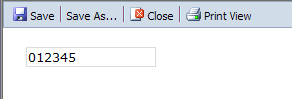
    Perhaps you should try re-adding your field?

    Hilary Stoupa

  • 09-22-2011 08:13 PM In reply to

    Re: Zero first in a text box.

    another way is to make your datatype to string then add this in the formula substring-after(concat("x", 100000 + 123), "x1") this results to: 100000+123 = 100123 x100123 00123 i use 'x' only as a marker happy programming :)
Page 1 of 1 (6 items)
Copyright © 2003-2019 Qdabra Software. All rights reserved.
View our Terms of Use.