I have a form that is going to be used for turnover documentation between shifts in an operational setting.
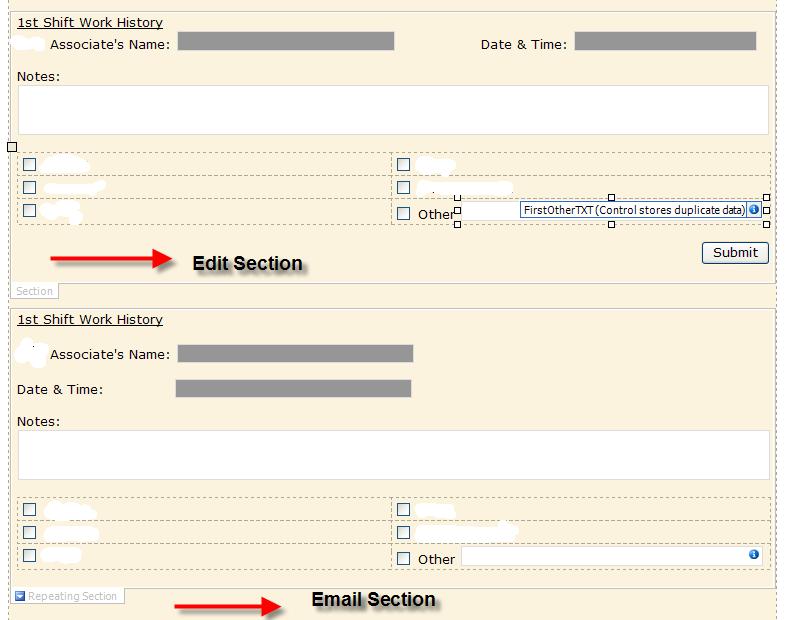
The form is split into 3 sections (1 for each of the 3 shifts). Each section (shift) has the exact same information..the only difference is the shifts. Each section has the following information:
Name (text)
Date / Time (date)
Notes (Rich Text)
Table with some check boxes for the user to check if certain work has been done or not.
There are multiple people working on each shift so I wanted each shift to have a repeating section so that if user 1 put in his info and submitted the form then person 2 could do the same and it would be separate entries. All of this is working fine....except for when I try to email the form.
I'm sure this was very confusing so if anyone could help that would be great and if anyone has any questions please ask..I really need to get this finished up so that I can get it off my plate!
Thanks!!!!!!
I used the method of making 2 separate sections for each shift to get the email function to work (ShowCustomEmailSection)...instead of switching views. As long as only 1 person make the entries and no extra entries are inserted into the repeating sections it works great! But if some tries to create a new entry it doesn't show the inserted section in the email.
Here is a screenshot....
![]()