how do i filter a view by task progress? - InfoPath Dev Sign in | Join | Help in Newbie Questions InfoPath (Entire Site) InfoPath Dev InfoPath Dev is dedicated to bringing you the information and tools you need to be successful in your Microsoft Office InfoPath development projects. Home Blogs Forums Photos Downloads InfoPath Dev » InfoPath » Newbie Questions » how do i filter a view by task progress? how do i filter a view by task progress? Last post 02-25-2009 08:21 AM by Anuma. 1 replies. Page 1 of 1 (2 items) Sort Posts: Oldest to newest Newest to oldest Previous Next 02-23-2009 06:59 AM charris1980 Joined on 12-23-2008 Posts 16 how do i filter a view by task progress? 2009-02-23_0854.png Reply Contact i'm trying to set up the view to show only "In Progress" documents from my workflow. whenever i choose to filter by "In Progress" it doesn't show anything (In Progress or Complete). am i using the wrong word here or is there a better way? thanks! 02-25-2009 08:21 AM In reply to Anuma Joined on 07-20-2005 India Posts 525 Re: how do i filter a view by task progress? Mark as Not AnswerMark as Answer... Reply Contact Hi, Are you setting your for status in "Office Internal Mail Requests Workflow" field? And also are you using exact text what you have given in the filter column for "In Progress" status? Anuma Chinthapalli /http://www.GGKTech.com Page 1 of 1 (2 items) Copyright © 2003-2019 Qdabra Software. All rights reserved.View our Terms of Use.
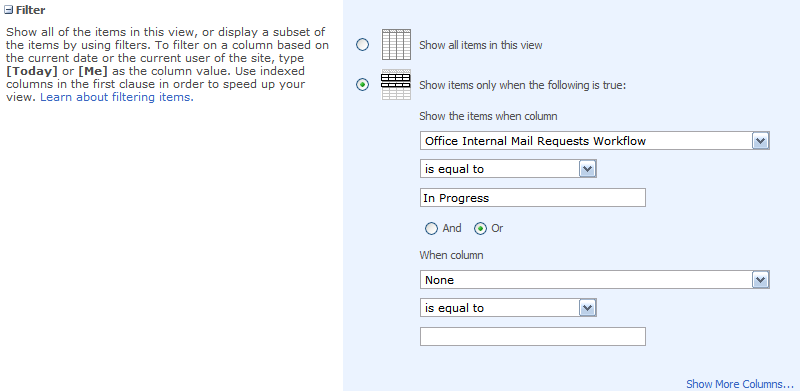
i'm trying to set up the view to show only "In Progress" documents from my workflow. whenever i choose to filter by "In Progress" it doesn't show anything (In Progress or Complete).
am i using the wrong word here or is there a better way?
thanks!
Hi,
Are you setting your for status in "Office Internal Mail Requests Workflow" field?
And also are you using exact text what you have given in the filter column for "In Progress" status?