I'm using IE 9 / ShP and IP 2010.
So, first I tried a .png file with spaces in the name:
http://*****/2012032011530530355_Run IP form with input params from command prompt.png
Opens in IE w/out a problem from the form or from the address bar.
Then I tried a Word doc w/ spaces in the name:
http://*****/2012032011550094711_QueryDB User Manual.doc
When I paste the URL in the browser address bar and hit enter, my spaces are replaced with %20 in both instances. Clicking the link in my form opens the linked file.
I tried a PDF:
http://*****/2012032012033800281_qRules User Guide.pdf
Clicking the link prompted me to download the file, didn't open directly - but I'm thinking that may be a ShP config issue on my test site.
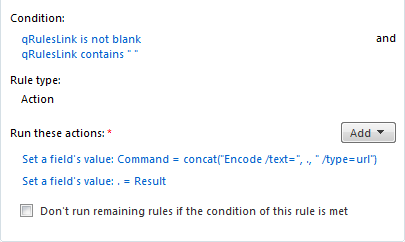
So - I'm not having this issue w/ spaces causing an issue - the URL not being encoded does not cause me an issue. However, since it is causing an issue for you - what about trying the encode command? You could set a rule on the qRules link field - if it isn't blank and if it contains spaces, you could use the Encode command to reset it to a URL encoded value. See attached screenshot.