OK. I swear
I have looked through these forums, MSDN and the web endlessly but I cannot
find the relevant pieces to properly place these things together. I've even
asked the question on the MS forums but it went unanswered for days (since
deleted) so I am trying here. I know my way around SP but I not so much
Infopath and I am not a dev but I'll go where the solution lies.
Scenario: User
has list in SP that tracks rejected materials. Every so often, the user needs
to create a credit memo to send to the supplier showing the rejected items and
calculates the cost of the order and totals up the complete credit. Today, its
a copy and pasted into an Excel form. The user would like to just select the
items to request credit for and hit a magic button to generate the email.
Solution: I
thought this would be easy to do in IP2010 but that is proving not the case and
perhaps this isn't even the right solution. My plan was (is?) to use an IP2010
form that would suck in the list data and filter for the items that haven't
been credited. I have done this using a secondary data connection, and dragging
that connection onto the form as a repeating table. I have the flter set to
only show the rows where a credit number doesn't exist.
I have also
managed to create a check box in the repeating table and binding that to a
empty text column in the SP list. This was the only way that I could get a
checkbox to work independently.
Where I am
stuck is what to do now. Can I select the rows from the repeating table and
have an uber button that generates and email? Should make the uber button
submit the form to a form library and then have a workflow gereate the email?
Can I even go from the form to an email (I can't attach the InfoPath form as I
can't assume the external recipients have IP2010).
My secondary data source is: /dfs:myFields/dfs:dataFields/d:SharePointListItem_RW.
My target table in the main data source is: /my:myFields/my:group1/my:copyGroup_rTbl
I am not looking for the
completed solution (that would be great) but really some direction. Am I going about this right? My weeklong search has me going down the path
of a code solution which is fine. If it
were code, I think that it would be a button that would collect all the selected
rows (where the control column=yes) and then generate an email. Is there a non-code way to do this? Also, not to be rude, but I can’t base it on
qrules right now.
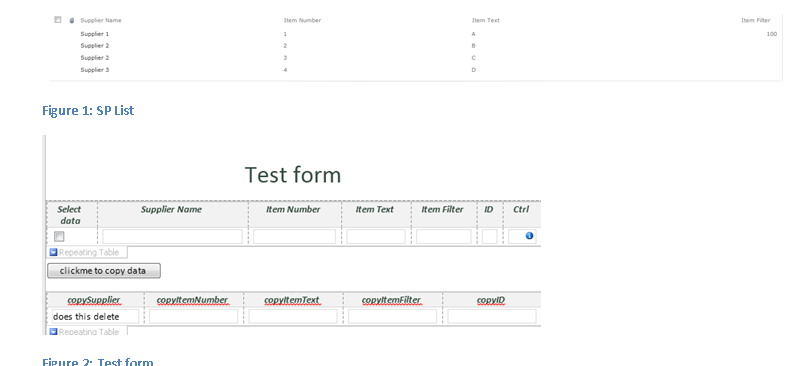
Please advise….I have attached a file with screenshots of the SP list and the current form I am using for a POC.