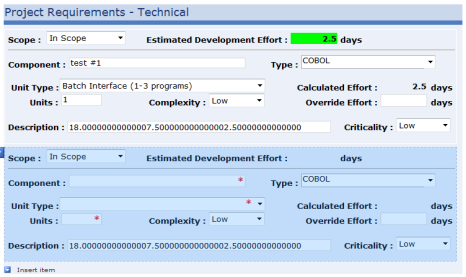
Hi. "my:ProjectRequirementsTechGroup" is the repeating section name and "my:TechUnitType" is a dropdown control field which is in the data source group called "my:PEProjectRequirementsTech". Since the user can change the unit size, unit type, or complexity I have modified all 3 controls to fire the same 3 rules (high, med, low) to calculate the estimated number of days work effort.
I did try adding current() based on reading these posts prior to your suggestion (appears I am on the right track), for both attempts below:
@Unit_Type = current()/my:PEProjectRequirementsTech/my:TechUnitType AND @Unit_Type = current()/my:TechUnitType
Either way, I got the same error: "my:PEProjectRequirementsTech/my:TechUnitType" does not point to a valid location path of a field or group.
../my:UnitSize * xdXDocument:GetDOM("Technical Unit Types & Complexity")/dfs:myFields/dfs:dataFields/dfs:Technical_Unit_Types/@Complexity_-_Low[../@Unit_Type = current()/my:PEProjectRequirementsTech/my:TechUnitType]
I did find that using "/../" after "current()" worked so that I could verify the formula:
../my:UnitSize * xdXDocument:GetDOM("Technical Unit Types & Complexity")/dfs:myFields/dfs:dataFields/dfs:Technical_Unit_Types/@Complexity_-_Low[../@Unit_Type = current()/../my:TechUnitType]
However, I can tell you that the problem seems to occur before any of the rules fire in that inserting the next group item still refers to the secondary data source attributes of the first group item. Please see the screen shot attached (I have used the description field to display the high, med, low complexity values for troubleshooting). Please let me know if you have any additional thoughts on what needs to be done to make this work. Thanks again for all of your help and suggestions. I sincerely appreciate this as I have been working on this for 2 weeks now.
Thanks