SharePoint/infopath: New item form, show past items - InfoPath Dev
in

InfoPath Dev

SharePoint/infopath: New item form, show past items

Last post 05-16-2015 09:25 PM by Reema Daga. 1 replies.
Page 1 of 1 (2 items)
Sort Posts: Previous Next
  • 05-15-2015 02:59 PM

    • Kugel
    • Not Ranked
    • Joined on 05-15-2015
    • Posts 1

    SharePoint/infopath: New item form, show past items

    I am noob when it comes to share point, so please bear with me. We use SharePoint 2010 list (not libraries). We have a list of equipment, and a list of support tickets. When a user creates a new ticket, i want the form to show the past tickets at a glance for that device to identify reoccurring issues. Reading around i see a lot of things about repeatable tables/section, which are missing on my info path (they say its for libraries only). How would i accomplish this?
  • 05-16-2015 09:25 PM In reply to

    Re: SharePoint/infopath: New item form, show past items

     Hi there,

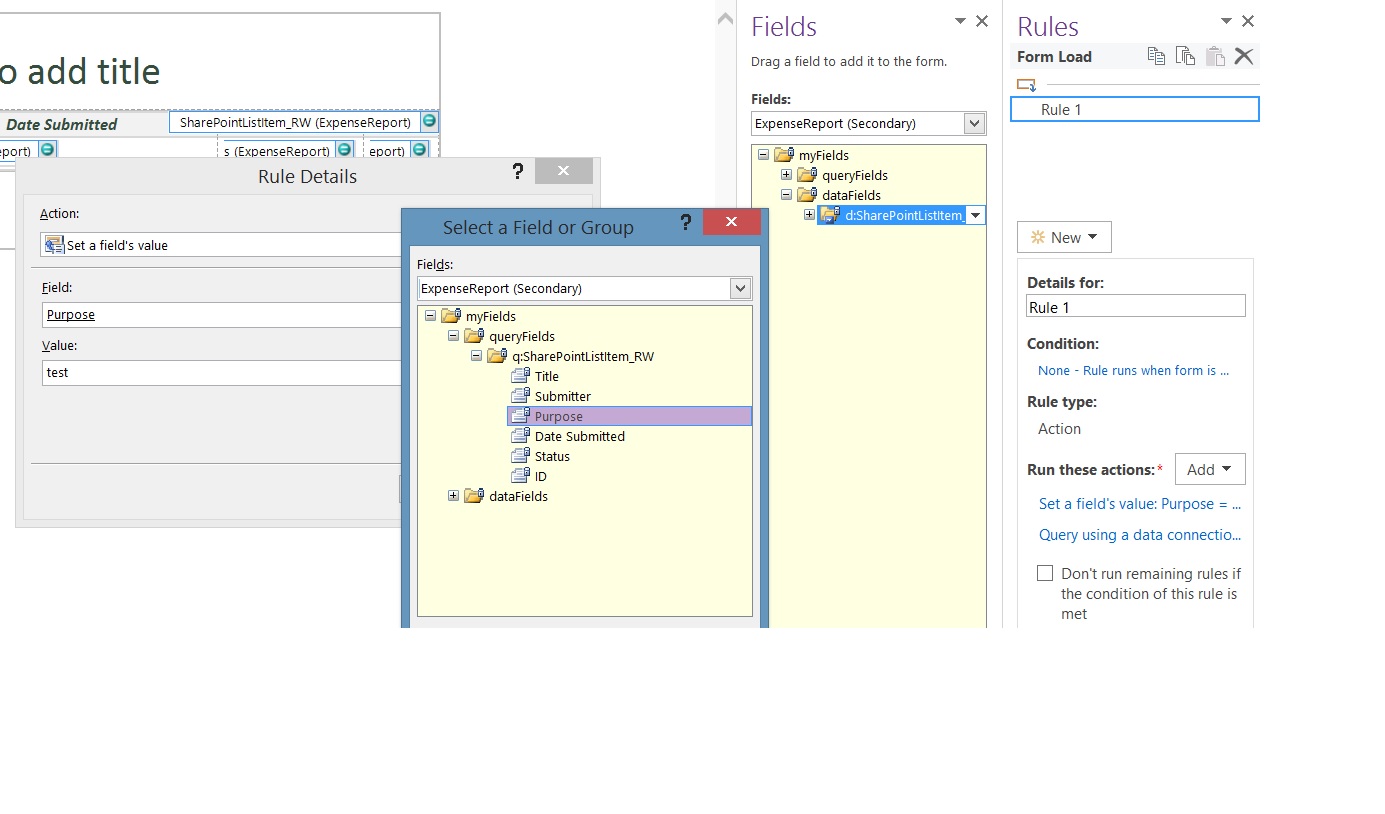
     Here are the steps to query the SharePoint list and display the data in your form:

     1) Create a receive data connection to that SharePoint list.

     2) Create a Rule and add an action to set a fields value to query the secondary data source for the device

     3) To that same rule add an action to Query for data and select the secondary data source.

     4) Select the secondary data source under Fields. Expand the dataFields and drag the repeating table to the canvas.


     Hope this helps!

     Kind Regards, 

    Reema Daga
    Qdabra® Software / InfoPathDev.com / FormsQuo / 425 999 4597 direct

    Business Process Automation for Everyone – Streamline data gathering to turn process into knowledge.™


Page 1 of 1 (2 items)
Copyright © 2003-2019 Qdabra Software. All rights reserved.
View our Terms of Use.