Hello Hilary Stoupa and other experts,
I created a infopath form with many check boxes that allow a user to select. I also published the ifopath form in the sharepoint and inserted it in the infopath web part.
When a form is submitted, it starts the workflow and an email will be sent out automatically to that user.
The problem that I am now facing is to "How to send an automatic email with the information from the infopath form's check-boxes that a user selected (including course no., date, topic).
In details, I target to achieve one of the followings:
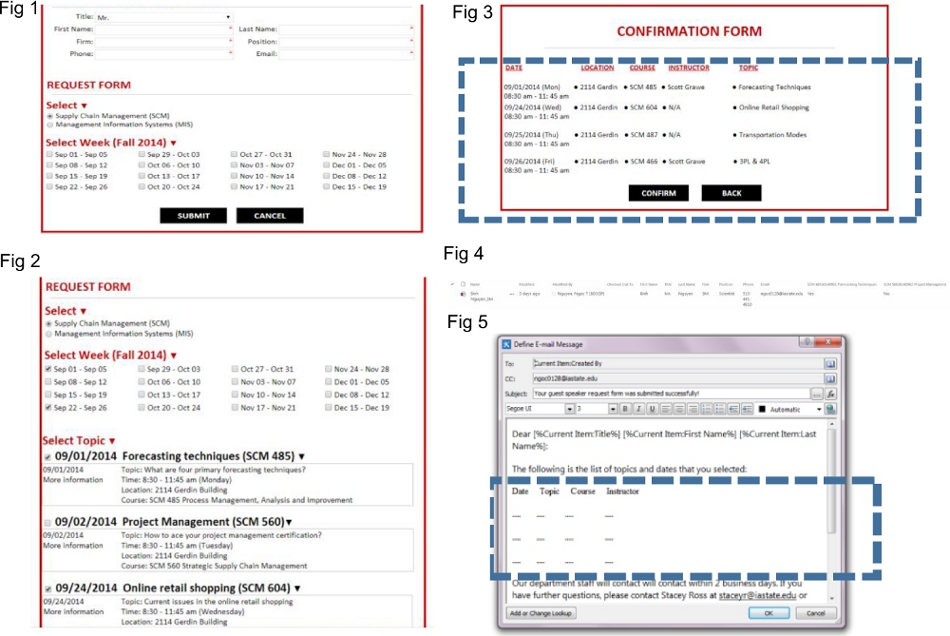
Option 1: Show the list of course, topic… that a guest speaker selected (see the attached file, figure 5) ... is something that I want to fill in with relevant information.
Option 2: Insert the link of figure 3 (see the attached file, figure 3). The link is the link of the document that is created in the sharepoint documents when the form is submitted.
I know it would be challenging to explain the problem only in words, please see the attached image.
Great thanks,
Jade Nguyen
P.S.: The following are the descriptions of figures in the attached file.
Figure 1: The infopath form (on infopath web part) that allows a guest speaker to fill in his/ her information and choose the dates and topics.
Figure 2: The request form that a guest speaker fills up on the infopath web part.
Figure 3: The confirmation form that shows a list of course, date, location, instructor and topic on the infopath web part.
Figure 4: Right after the confirmation form is submitted, all information (a guest speaker’s info; list of selected course, topic, date, instructor, location) is stored in the doc. file on the sharepoint.
Column “Yes” means that a guest speaker selected the topic.
Column “No” means that a guest speaker didn’t select the topic.
The field of a checkbox is named in the following format: SCM50120140610Risk Management, where SCM501 is course no.; 20140610 is the date; and Risk Management is the topic
Figure 5: Automatic email created on the SharePoint Designer.
I tried to insert the link of the document doc. file (See figure 4) in the automatic email but that has one shortcoming because it shows only 1 specific request form, not case by case.