Submit Using Rules Based on Section Value - InfoPath Dev
in

InfoPath Dev

Submit Using Rules Based on Section Value

Last post 07-21-2008 02:31 PM by tms8707056. 7 replies.
Page 1 of 1 (8 items)
Sort Posts: Previous Next
  • 07-18-2008 06:40 AM

    Submit Using Rules Based on Section Value

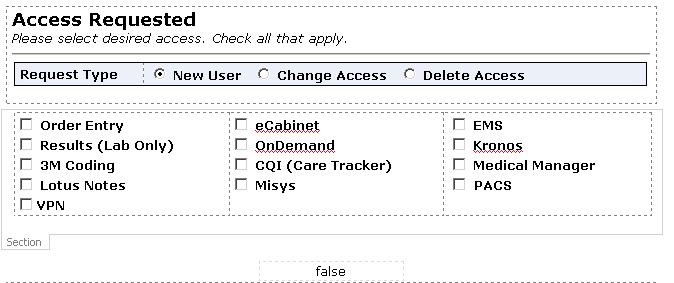
    I am having trouble using rules based on a section's value to submit a form.  The attached file is an image of the section I am basing the rules on. There are several checkboxes in the section (Access), each is set so that the value is blank when unchecked, and will contain the application/service name when checked.  My rules are configured as follows:

    1. If PACS is not blank, change view to PACS Email and submit form using PACS Email Submit.
    2. If my:Access="PACS", quit processing rules.
    3. Rule always applies, submit using Helpdesk Email Submit.

    Rule 2 should prevent the helpdesk from receiving an email if PACS is the only access selected.  However, it does not seem to trigger when filling the form out in a browser or when previewing the form in InfoPath 2007. To test this I created an expression box (bottom of attached image) with the following formula: my:Access="PACS".  If I check or uncheck the box in the control's preferences while in design view the expression evaluates correctly (true for checked, false for unchecked).  When I preview the form, the expression only evaluates to the default state of the control when the form preview was opened.  It will not refresh when the box is toggled.  The same happens in the browser. 

     What am I doing wrong and how can I get this to work?

  • 07-18-2008 09:12 AM In reply to

    Re: Submit Using Rules Based on Section Value

    You cannot validate a section.

    You would need to check the value of each checkbox field.

    This can be broken up with multiple fields.

  • 07-18-2008 10:21 AM In reply to

    Re: Submit Using Rules Based on Section Value

     That is what I was suspecting, I just couldn't find that documented anywhere.

    Do you think this would work?

    Create a "validation field" that corresponds to each column.
    Set the value of the field to 1 if all items in that column are blank (the PACS field would obviously have to be excluded).
    Then create a submit rule that will stop rule processing if all "validation fields" are equal to 1 before the Helpdesk email is sent.

  • 07-18-2008 10:40 AM In reply to

    Re: Submit Using Rules Based on Section Value

    Exactly.

    You coulde have a validate field by column or section.

    Then just check your validate fields on submit.

  • 07-18-2008 11:02 AM In reply to

    Re: Submit Using Rules Based on Section Value

    So I tried it like I stated above, and it still will not work. The column validation fields will not update when an item is selected in the corresponding column.  True = Column is blank for the validation fields. Default value is true.  The rules for changing the values of the validation fields are in the properties of the same field.  Should this matter?  I have attached a screenshot of my logic. Any ideas?  Thanks for your help.


  • 07-21-2008 02:03 PM In reply to

    Re: Submit Using Rules Based on Section Value

    OK.... I figured out that the rules are not applying to the validation field because there is not a control being manipulated for that field.  If I make a control for the validation fields and toggle or type in them they will apply the rules and show the correct values.  So, the rules will not apply if they are on the validation fields. 

    My idea now is to create a validation field that will count exactly how many boxes are checked.  I figure a rule on each box to increase the number of the validation field by 1 when checked will work.  The validation field should keep a running total.  For example, all boxes are not checked by default, so the total for the validation field starting off would be 0.  Box one and box two get checked making the total 2.  However, if the user unchecks box one, leaving box two checked, then the total should drop to 1 to remain accurate.  I am not familiar enough with formulas to get it working.  Can somebody help me out?

  • 07-21-2008 02:23 PM In reply to

    Re: Submit Using Rules Based on Section Value

    Have you trouble shot each field.

     I would drag each one to your view and then test checking each fiald and verify the the conditions are being met for each component.

    Typically and and or an or is incorrect. You just have to break it down and verify each peice.

  • 07-21-2008 02:31 PM In reply to

    Re: Submit Using Rules Based on Section Value

    I was editing my post when you replied.  Check my previous post for the updated information.  Thanks.

Page 1 of 1 (8 items)
Copyright © 2003-2019 Qdabra Software. All rights reserved.
View our Terms of Use.