I've searched around here and the rest of the net for some way to accomplish this, and am coming up empty. Hopefully someone here can help! There are actually a couple related questions.
Here are the versions I'm working with: SharePoint 2010, InfoPath 2013 (2010 browser form)
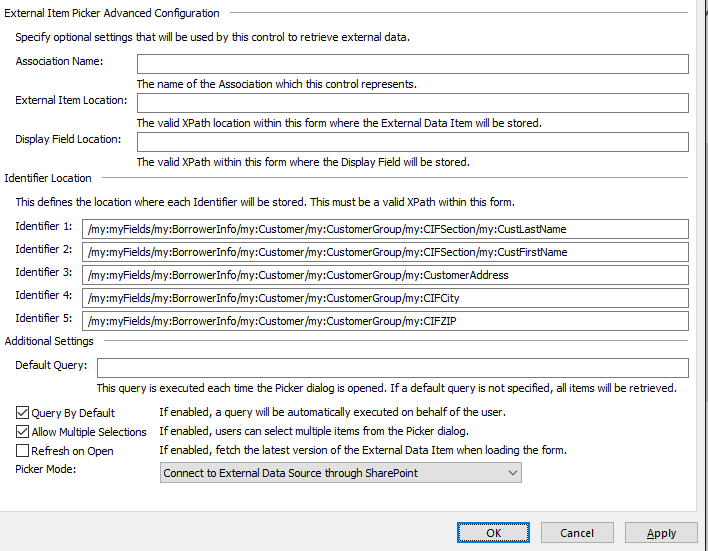
I've got a pretty complex form that includes a section for customer information. There is an option to select "Existing Customer," and if it is selected an external item picker will appear, allowing the person filling out the form to select a customer from our SQL database. We created a SQL view containing just the columns we need, and I setup an external content type in SP Designer with identifiers for as many fields as I can. It appears I'm only able to reference five identifiers plus one display field using the external item picker in InfoPath. I know it's possible to create an external list in SP and reference that in the item picker, but the load time for the list - and thus, the form - is really bad. I would like the customer information fields to auto-populate as much as possible. As you can see in the ECT Properties attachment, I pointed the identifiers to the appropriate XPaths in the form. This works great, and everything loads quickly. Unfortunately, I am limited to six total fields using this method. Is there a way to auto-populate more, possibly not using the external item picker's "Identifier Location" boxes?
Setting that aside, I like the way the six fields populate when a person is selected. However, if the person filling out the form uses the repeating section to add another customer, that's when things go wrong. If he/she selects "Existing Customer" again, and picks someone from the picker window, the auto-populate will overwrite all six fields in the first instance of the repeating section. I'm not finding a way to reference the relative path for the exact instance of the repeating section that the picker falls within. Is there a way to do this?
Thank you for any suggestions you can provide!