Hi,
This is my first post and i'm new to InfoPath 2010 so apologies if this is ambiguous.
I am trying to add a rule to submit data that uses a SOAP data connection to Excel Services.
I'm using the SetRangeA1 operation and am having an issue with the array sizes. I have a repeating table which for testing purposes I have one column and only ever add one row when previewing.
I have set the tns:rangeName to a text box control that has a default value of "A1:A2"
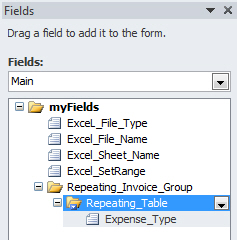
I have set the tns:RangeValues parameter to the Group that contains the Repeating table.
When I run it and try and add a mixture of 0,1 or 2 rows I get the following error message:
"InfoPath cannot submit the form.
An error occurred while the form was being submitted.
The SOAP response indicates that an error occurred on the server:
The size of the provided array does not match the size and shape of the destination range."
I have uploaded a screenshot of the fields and highlighted the group I am assigning as range values. What am I doing wrong here and is there an easier way to accomplish this? I can get the OpenWorkBook / SetCellA1 operations working fine?
Any help would be much appreciated as this is a showstopper for this particular project,
Thanks
Jake