Hi Team,
Please resolve the below issue as it was very urgent.
My client having requirement open a outlook window once clicked button in infopath from 2007.
I was resolved using below procedure and code.
I have added Outlook interop reference to the infopath code project and coded like below.
Interop assembly added path : C:\Program Files\Microsoft Visual Studio 10.0\Visual Studio Tools for Office\PIA\Office12\Microsoft.Office.Interop.Outlook.dll
code :
public string CreatePDF()
{
// Create HTML.
try
{
XPathNavigator xnDoc = this.MainDataSource.CreateNavigator();
XPathNavigator xnMyField = xnDoc.SelectSingleNode("/my:XXXXXXXXXXX/my:woDetails/my:XXXXXXXXName" , this.NamespaceManager);
wordordername = xnMyField.Value;
fileName = wordordername + ".pdf";
filePath = Path.Combine(Path.GetTempPath(), fileName);
this.CurrentView.Export(filePath, ExportFormat.Pdf);
return filePath;
}
catch
{
return filePath;
}
}
public void CTRL25_19_Clicked(object sender, ClickedEventArgs e)
{
Outlook.Application oApplication = new Outlook.Application();
Outlook.MailItem newMail = (Outlook.MailItem)oApplication.CreateItem(Outlook.OlItemType.olMailItem);
filePath = CreatePDF();
XPathNavigator xnDoc = this.MainDataSource.CreateNavigator();
XPathNavigator xnCPField = xnDoc.SelectSingleNode("/my:XXXXXXXXXXXXXX/my:XXXXXXx/my:XXXXXXXx", this.NamespaceManager);
XPathNavigator xnMyField = xnDoc.SelectSingleNode("/my:XXXXXXXXXXXXXXXxx/my:XXXXXX/my:XXXXXX", this.NamespaceManager);
newMail.To = xnCPField.Value;
newMail.CC = xnMyField.Value;
newMail.Subject = "Please approve ";
newMail.BodyFormat = Outlook.OlBodyFormat.olFormatHTML;
newMail.HTMLBody = "Dear Customer
Thanks ";
newMail.Attachments.Add(filePath, Outlook.OlAttachmentType.olByValue, 1, "Form");
newMail.Display(true);
}
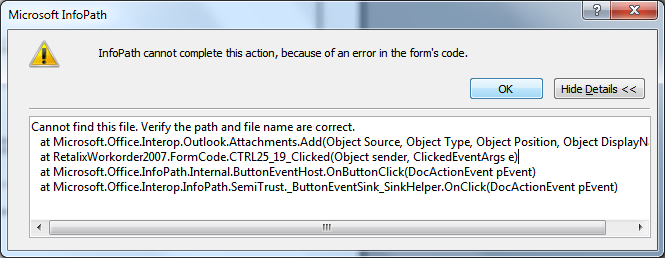
Issue : Clients who are having infopath 2007 are working fine but who are having infopath 2010 getting error screenshot which is attached to post...
Please resolve the issue asap.
thanks,
VR