New to Infopath - Need formula assistance - InfoPath Dev
in

InfoPath Dev

New to Infopath - Need formula assistance

Last post 08-23-2012 12:22 PM by Warren Williams. 4 replies.
Page 1 of 1 (5 items)
Sort Posts: Previous Next
  • 08-23-2012 09:46 AM

    New to Infopath - Need formula assistance

    Good afternoon.

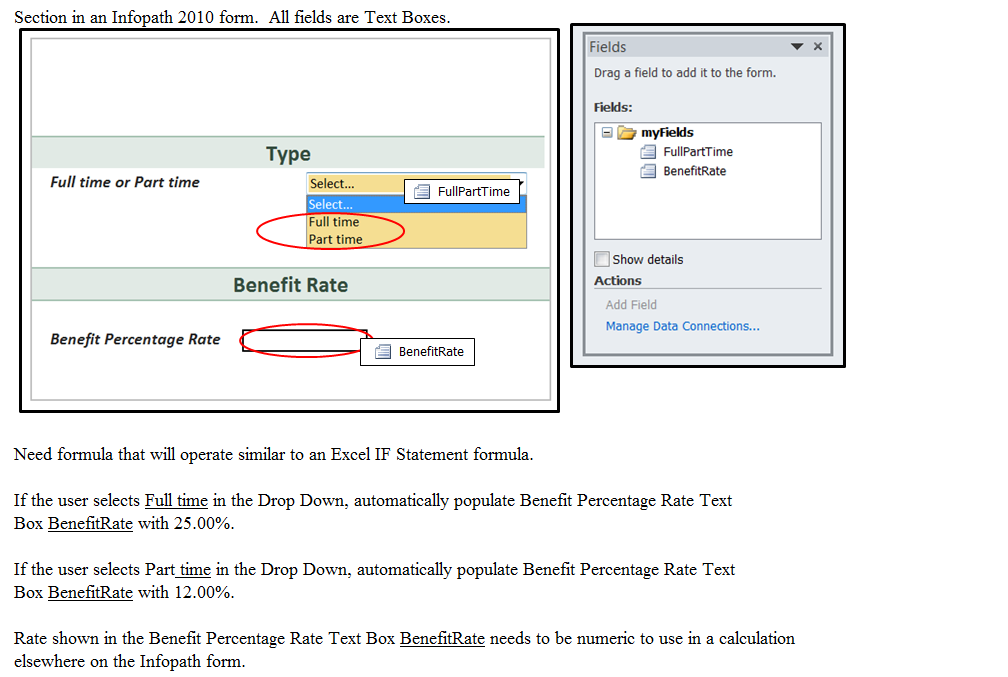
    I am a week new to Infopath 2010 and need expert assistance for a 'formula' to use in the form. I have attached a PNG
    image file that hopefully helps visually.

    In the form, I have a Drop Down that has two selections ...  Full time and Part time.

    I need a formula that will do the following:

    If the user selects Full time in the Drop Down, automatically populate Benefit Percentage Rate Text Box BenefitRate with 25.00%.

    If the user selects Part time in the Drop Down, automatically populate Benefit Percentage Rate Text Box BenefitRate with 12.00%.

    Rate shown in the Benefit Percentage Rate Text Box BenefitRate needs to be numeric to use in a calculation elsewhere in the Infopath form.

    Thank you!

    Warren


  • 08-23-2012 10:02 AM In reply to

    Re: New to Infopath - Need formula assistance

    You'll want to create two rules on the dropdown. Each rule will have one of your conditions. The rule will simply Set a field's value. The field whose value will be set is the Benefit Rate field and the value for that field will be either 25 or 12, to match your conditions.

    I don't think there's a formula (if by that you mean a default value) that needs to be used. Simple having the two rules, each with one of the conditions, will be good enough, I think.

    Good luck!

    Ernesto Machado
    Qdabra® Software/ InfoPathDev.com
    The InfoPath Experts – Streamline data gathering to turn process into knowledge.™


  • 08-23-2012 11:24 AM In reply to

    Re: New to Infopath - Need formula assistance

    Hi Ernesto,

    Thank you so much for your quick response.

    I tried what I think you said, but did not have any luck in getting the 25.00 or 15.30 rate to show in the Text Box field Benefit Rate, after I selected Full time or Part time from the Drop Down.

    Would you mind being more specific or re-word for me?  I am so new at this!

    Thank you!

    Warren 

  • 08-23-2012 11:40 AM In reply to

    Re: New to Infopath - Need formula assistance

    Hi Warren,

    I'm attaching a sample form.

    We have free training labs up on our blog: here and here.

    Another sample training here: part 1, 2, 3 and 4.

    For more on our InfoPath training, you'll find information here.

    Thanks!


    Ernesto Machado
    Qdabra® Software/ InfoPathDev.com
    The InfoPath Experts – Streamline data gathering to turn process into knowledge.™


  • 08-23-2012 12:22 PM In reply to

    Re: New to Infopath - Need formula assistance

    Ernesto,

    I got it to work now!  Awesome!  Thank you for the attachment... that really helped me look at ALL the details in the rules and a better understanding (I hope)

    of the logic in how to properly set them up. 

    Thank you so much!

    I will look at the training labs and sample training you mentioned.

    Warren 

Page 1 of 1 (5 items)
Copyright © 2003-2019 Qdabra Software. All rights reserved.
View our Terms of Use.