Recalculate lot price selection after changes in table - InfoPath Dev
in

InfoPath Dev

Recalculate lot price selection after changes in table

Last post 08-24-2017 02:12 PM by FlameKurosei. 33 replies.
Page 3 of 3 (34 items) < Previous 1 2 3
Sort Posts: Previous Next
  • 08-23-2017 01:16 PM In reply to

    Re: Recalculate lot price selection after changes in table

    Hi again Hilary,

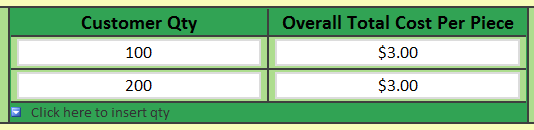
    I'm stuck again trying to get the "Overall Cost Per Piece" field to work on bottom of the first page (the Customer Information view). I added a "current()" to the formula and it still continues to display the first row duplicated downward.

     EDIT: For clarification, the field should be the sum of both the "CostPerPieceRAW" and "CostPerPieceR", divided by two when the two fields are equal in customer quantity.

     For example:

    • Routing Totals =
      • [100=$3.00]
      • [200=$1.00]
    • Raw Material Totals =
      • [100=$5.00]
      • [200=$2.50]
    • Then Customer Information Totals =
      • [100=$8.00]
      • [200=$3.50]

    I'm assuming I'm missing a preceding-sibling or following-sibling to the formula...? It seems awfully simple.

    (Thank you again in advance.)

  • 08-23-2017 04:58 PM In reply to

    Re: Recalculate lot price selection after changes in table

    Try this one.
    Hilary Stoupa

  • 08-24-2017 12:21 PM In reply to

    Re: Recalculate lot price selection after changes in table

    Edit: Hmm, I must be doing something wrong with your modification. It's still showing me the first row duplicated.

    However, it will show the correct pricing if I only fill in one of the pages (either the Raw Material or the Routing pages).

    Edit 2: Never mind! I set something as a textbox instead of a calculated value by mistake. I think that's where the issue is, since it works now.

  • 08-24-2017 02:12 PM In reply to

    Re: Recalculate lot price selection after changes in table

     Hello again Hilary,

     May I ask what you changed to make this modification work? I'm a little lost on trying to recreate it.

    Thank you,

    Flame

Page 3 of 3 (34 items) < Previous 1 2 3
Copyright © 2003-2019 Qdabra Software. All rights reserved.
View our Terms of Use.