Merge fields from Repeating Table and Align Rows. - InfoPath Dev
in

InfoPath Dev

Merge fields from Repeating Table and Align Rows.

Last post 01-28-2013 04:55 AM by Tughsol. 3 replies.
Page 1 of 1 (4 items)
Sort Posts: Previous Next
  • 01-16-2013 02:00 AM

    Merge fields from Repeating Table and Align Rows.

    Hi,

    Sorry if this has already been asked. I tried to search for a similar post but couldn't find one.

    I am using InfoPath to gather information from users and then have a Workflow create a Word Document of the information using the Quick Part Document Properties. This has worked well to date but now I have an issue when merging four fields from a Repeating Table.

    My Repeating Table contains four fields: Name, Date, Time and Narrative. The Narrative field is a Multi-Line Text Field as users may wish to enter quite a detailed narrative. The issue I have is that the other three fields just stack the data one line on top of the other and dont allow for the multiple lines of the Narrative. I need to find some way to merge the Repeating Field but add a Line or Paragraph break between each entry and then align the other fields to it.

    I was thinking the best way would be to create a new text box, or four, new text boxes in a different view and use some XML Code to replicate the Repeating Table and allow for the breaks.

    I'm not sure of this is possible and I don't really have any experience of using XML. If anyone can help or offer an alternative it would be much appreciated.

    Thanks!
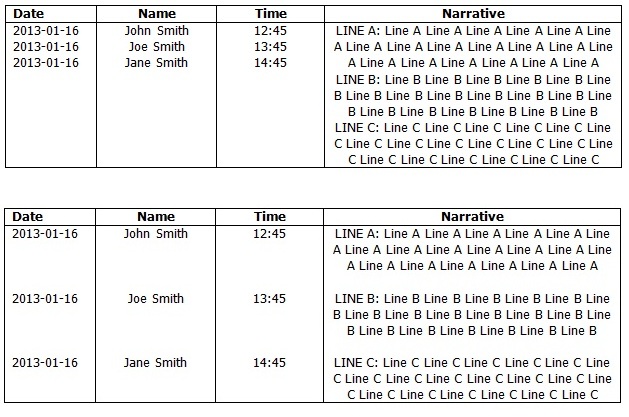

  • 01-16-2013 04:02 AM In reply to

    Re: Merge fields from Repeating Table and Align Rows.

    What about the String-Lenght Function in InfoPath even?

    I know this counts the number of characters in a string. Would there be any way to count the Characters in each Repeating Field Row for the Narrative and then apply the same number as blank spaces to the other fields? That would in effect create the same spacing and allow the next entry to lign up?!?

    Thanks

  • 01-22-2013 04:57 AM In reply to

    Re: Merge fields from Repeating Table and Align Rows.

    Any ideas?

    Thanks.

  • 01-28-2013 04:55 AM In reply to

    Re: Merge fields from Repeating Table and Align Rows.

    Ok I've found a solution for my problem. It isn't exactly the way I wanted it but I've checked with my Managers and they are happy enough to change the layout slightly.

    I am now going to set it up so it will look like:

    [Date]

    [Name] [Time]

    [Narrative]

    To do this I have created a new field which I am going to use with the Eval and Concat functions to achieve this. The default value for the field is as below. I will then use this field as my Column instead so it passes straight through to Word as one Doc Property which is already formatted correctly. To create the line breaks in the below formula I just pressed Ctrl+Enter

    eval(eval(Narrative, 'concat(Date, "

    ", Name, " ", Time, "

    ", Narrative, "

    ")'), "..")

    Thanks

Page 1 of 1 (4 items)
Copyright © 2003-2019 Qdabra Software. All rights reserved.
View our Terms of Use.