Query Builder "and or" structure - InfoPath Dev
in

InfoPath Dev

Query Builder "and or" structure

Last post 08-26-2010 01:07 PM by Marzipan. 11 replies.
Page 1 of 1 (12 items)
Sort Posts: Previous Next
  • 06-02-2010 07:16 AM

    Query Builder "and or" structure

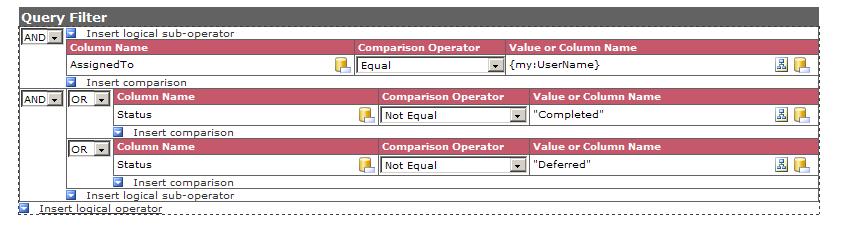
    I am trying to use the query builder to construct a and or query (see attatched jpeg), I assume I am not structuring it properly.

    the query results is:

     concat("<query><columns><column name='ID'/><column name='Title'/><column name='Status'/><column name='DueDate'/><column name='CalendarItem'/><column name='Modified_x0020_Comment'/><column name='Status'/><column name='AssignedTo'/><column name='Editor'/></columns><filter><and><and><eq><column name='AssignedTo'/><value>", xdXDocument:get-DOM()/my:Tasks/my:UserInfo/my:UserName ,"</value></eq></and><and><or><ne><column name='Status'/><value>"Completed"</value></ne></or><or><ne><column name='Status'/><value>"Deferred"</value></ne></or></and></and></filter><sort><column name='DueDate' order='ASC'/></sort></query>")

    I'm getting the following error:

     The query cannot be run for the following DataObject: GetListItemsStr
    InfoPath cannot run the specified query.
    The SOAP response indicates that an error occurred on the server:

    System.Web.Services.Protocols.SoapException: Server was unable to process request. ---> System.Xml.XmlException: Data at the root level is invalid. Line 1, position 1.
       at System.Xml.XmlTextReaderImpl.Throw(Exception e)
       at System.Xml.XmlTextReaderImpl.ParseRootLevelWhitespace()
       at System.Xml.XmlTextReaderImpl.ParseDocumentContent()
       at System.Xml.XmlLoader.Load(XmlDocument doc, XmlReader reader, Boolean preserveWhitespace)
       at System.Xml.XmlDocument.Load(XmlReader reader)
       at System.Xml.XmlDocument.LoadXml(String xml)
       at Qdabra.Dbxl.WebService.QuerySharePointService.XmlFromString(String str)
       at Qdabra.Dbxl.WebService.QuerySharePointService.GetListItemsStr(String listUrl, String query, String queryOptions)
       --- End of inner exception stack trace --- 


  • 06-02-2010 07:26 AM In reply to

    Re: Query Builder "and or" structure

    Hello,

    I think it would be helpful to know the following:

    1. What is the first query generated by QueryBuilder? (just paste the <query> string into your reply.

    2. If you use that first query to create the data connection, do you get an error in InfoPath, or is the data connection created succesfully?

    3. How is the concat query string used in the form? (a screenshot of the rules would be fine)

    Thanks in advance for the additional information.

    Ernesto Machado
    Qdabra® Software/ InfoPathDev.com
    The InfoPath Experts – Streamline data gathering to turn process into knowledge.™


  • 06-02-2010 07:47 AM In reply to

    Re: Query Builder "and or" structure

    The XML looks valid but the error suggests that you are using that concat() expression in the Data Connection Wizard.  You should be using the sample query (without concat()) in the Data Connection Wizard.

     I think there is an error in your reasoning and that OR is not really merited here.  It looks like you are trying to create this expression:

    (AssignedTo = my:UserName) AND ((Status != 'Completed) OR (Status != 'Deferred'))

    This will return records regardless of their status because one of  (Status != Completed)/(Status != 'Deferred') will always be true.

     It seems to me that what you actually need is a regular 3-way and expression:

    (AssignedTo = my:UserName) AND (Status != 'Completed) AND (Status != 'Deferred')

    Jimmy Rishe / Software Developer / Microsoft MVP
    Qdabra Software
  • 06-02-2010 09:09 AM In reply to

    Re: Query Builder "and or" structure

    To answer Ernesto's question:

    Here is the 1st query and yes it works fine.

    <query maxrows='2'><columns><column name='ID'/><column name='Title'/><column name='Status'/><column name='DueDate'/><column name='CalendarItem'/><column name='Modified_x0020_Comment'/><column name='Status'/><column name='AssignedTo'/><column name='Editor'/></columns><sort><column name='DueDate' order='ASC'/></sort></query>

    I have attatched images of the form rule where I am setting the query field.  I am entering the statement from the form in the value field which is a concat statement, what seems odd is the program seems to be appending another concat statement  (see images).

    Jimmy, I will change the logic struture and see if that helps. 


  • 06-02-2010 09:18 AM In reply to

    Re: Query Builder "and or" structure

    When entering the concat() function into the rule, first click on the function button (fx), then paste the concat() function into the next dialog.

    Ernesto Machado
    Qdabra® Software/ InfoPathDev.com
    The InfoPath Experts – Streamline data gathering to turn process into knowledge.™


  • 06-02-2010 09:28 AM In reply to

    Re: Query Builder "and or" structure

    ok.  that worked (wierd), not getting error but also not getting any results.

     the query field value ends up being set as:

    <query><columns><column name='ID'/><column name='Title'/><column name='Status'/><column name='DueDate'/><column name='CalendarItem'/><column name='Modified_x0020_Comment'/><column name='Status'/><column name='AssignedTo'/><column name='Editor'/></columns><filter><and><and><contains><column name='AssignedTo'/><value>mbj3f</value></contains></and><and><ne><column name='Status'/><value>Completed</value></ne></and><and><ne><column name='Status'/><value>Deferred</value></ne></and></and></filter><sort><column name='DueDate' order='ASC'/></sort></query>


  • 06-02-2010 09:38 AM In reply to

    Re: Query Builder "and or" structure

    That query looks ok.  Have you checked to make sure there's a row in the table where AssignedTo contains mbj3f, and status is not Completed or Deferred?

    Jimmy Rishe / Software Developer / Microsoft MVP
    Qdabra Software
  • 06-02-2010 09:55 AM In reply to

    Re: Query Builder "and or" structure

    That worked.  Thanks Jimmy, sometimes it is the obvious.


  • 08-26-2010 07:47 AM In reply to

    Re: Query Builder "and or" structure

    I'm trying to move from evaluating the "AssignedTo" field against the userName() function to the value in   /my:Tasks/my:UserInfo/my:DisplayName  in the querystring for [GetListItemsStr] .

     concat("<query><columns><column name='ID'/><column name='Title'/><column name='Status'/><column  name='DueDate'/><column name='CalendarItem'/><column name='Modified_x0020_Comment'/><column  name='Status'/><column name='AssignedTo'/><column name='Editor'/></columns><filter><and><contains><column  name='AssignedTo'/><value>", userName(), "</value></contains><ge><column  name='StartDate'/><value>", addDays(today(), -30), "</value></ge></and></filter><sort><column  name='DueDate' order='DESC'/></sort></query>")

    Can someone give me an example of the syntax to use "/my:Tasks/my:UserInfo/my:DisplayName" value vs. "userName()"


  • 08-26-2010 07:54 AM In reply to

    Re: Query Builder "and or" structure

    Just position your cursor where userName() is currently located, delete the text userName() and use the Insert Field... dialog to insert the DisplayName field into the formula.  That should do the job.

    Jimmy Rishe / Software Developer / Microsoft MVP
    Qdabra Software
  • 08-26-2010 09:38 AM In reply to

    Still getting error "Some rules not applied". (see picture)

    System.Web.Services.Protocols.SoapException: Server was unable to process request. ---> System.Xml.XmlException: Data at the root level is invalid. Line 1, position 1.
       at System.Xml.XmlTextReaderImpl.Throw(Exception e)
       at System.Xml.XmlTextReaderImpl.ParseRootLevelWhitespace()
       at System.Xml.XmlTextReaderImpl.ParseDocumentContent()
       at System.Xml.XmlLoader.Load(XmlDocument doc, XmlReader reader, Boolean preserveWhitespace)
       at System.Xml.XmlDocument.Load(XmlReader reader)
       at System.Xml.XmlDocument.LoadXml(String xml)
       at Qdabra.Dbxl.WebService.QuerySharePointService.XmlFromString(String str)
       at Qdabra.Dbxl.WebService.QuerySharePointService.GetListItemsStr(String listUrl, String query, String queryOptions)
       --- End of inner exception stack trace --- 

    Here is the query string:

     concat("<query><columns><column name='ID'/><column name='Title'/><column name='Status'/><column  name='DueDate'/><column name='CalendarItem'/><column name='Modified_x0020_Comment'/><column  name='Status'/><column name='AssignedTo'/><column name='Editor'/></columns><filter><and><contains><column  name='AssignedTo'/><value>", my:UserInfo/my:DisplayName, "</value></contains><ge><column  name='StartDate'/><value>", addDays(today(), -30), "</value></ge></and></filter><sort><column  name='DueDate' order='DESC'/></sort></query>")


  • 08-26-2010 01:07 PM In reply to

    Re: Query Builder "and or" structure

    The query needed to be:

    concat("<query><columns><column name='ID'/><column name='Title'/><column name='Status'/><column name='DueDate'/><column name='CalendarItem'/><column name='Modified_x0020_Comment'/><column name='Status'/><column name='AssignedTo'/><column name='Editor'/></columns><filter><and><contains><column name='AssignedTo'/><value>",xdXDocument:get-DOM()/my:Tasks/my:UserInfo/my:DisplayName,"</value></contains><ge><column name='StartDate'/><value>", addDays(today(), -30), "</value></ge></and></filter><sort><column name='DueDate' order='DESC'/></sort></query>")


Page 1 of 1 (12 items)
Copyright © 2003-2019 Qdabra Software. All rights reserved.
View our Terms of Use.