Field alignment in Browser - InfoPath Dev Sign in | Join | Help in Browser Forms InfoPath (Entire Site) InfoPath Dev InfoPath Dev is dedicated to bringing you the information and tools you need to be successful in your Microsoft Office InfoPath development projects. Home Blogs Forums Photos Downloads InfoPath Dev » InfoPath » Browser Forms » Field alignment in Browser Field alignment in Browser Last post 06-04-2010 05:46 AM by Marzipan. 1 replies. Page 1 of 1 (2 items) Sort Posts: Oldest to newest Newest to oldest Previous Next 06-02-2010 07:45 AM Marzipan Joined on 04-14-2010 Posts 117 Field alignment in Browser formrender.JPG Reply Contact When I render a form in the browser vs. previewing, my comment field gets moved down. (see attached) Are there margin limits or settings I should be using to display the form as needed in the browser? 06-04-2010 05:46 AM In reply to Marzipan Joined on 04-14-2010 Posts 117 Re: Field alignment in Browser Mark as Not AnswerMark as Answer... Reply Contact I inserted a table into the repeating section and placed the fields in the table. This worked. Page 1 of 1 (2 items) Copyright © 2003-2019 Qdabra Software. All rights reserved.View our Terms of Use.
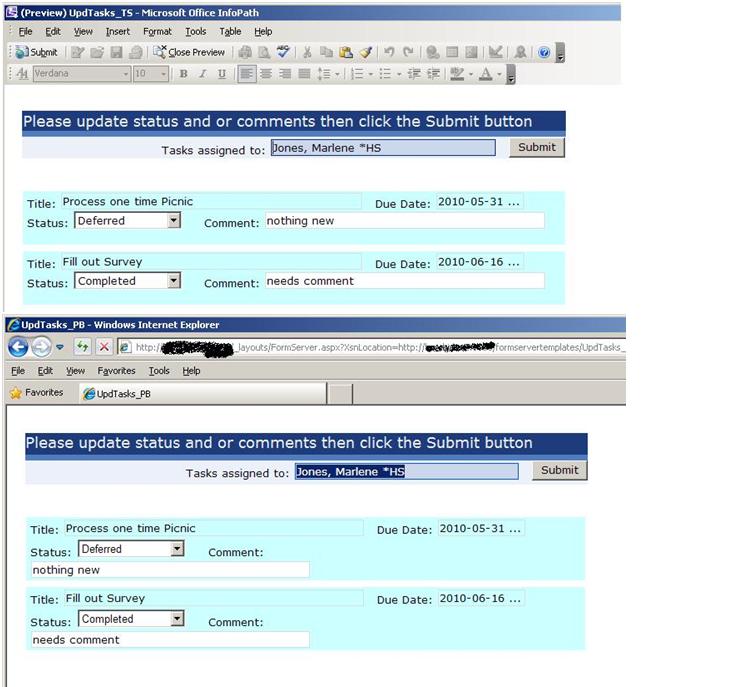
When I render a form in the browser vs. previewing, my comment field gets moved down. (see attached)
Are there margin limits or settings I should be using to display the form as needed in the browser?
I inserted a table into the repeating section and placed the fields in the table. This worked.