Removing the "remove" option from Repeating Table (Master) - InfoPath Dev
in

InfoPath Dev

Removing the "remove" option from Repeating Table (Master)

Last post 06-14-2013 05:47 AM by ErnestoM. 1 replies.
Page 1 of 1 (2 items)
Sort Posts: Previous Next
  • 06-13-2013 12:12 PM

    Removing the "remove" option from Repeating Table (Master)

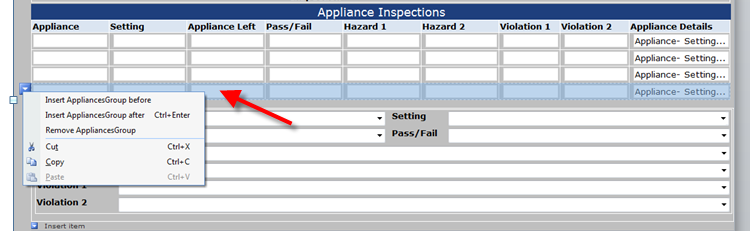
    I have a Repeating table that can have inserts added by the end user. A scenerio I have is when an inserts are made an additional blue box with an arrow pops-up giving the user the option to "Insert before, Insert after and Remove". This option allows the user to remove the extra tables as needed. The issue though is the user can then remove the original table which deletes the entire table along with the validation which is creating errors elsewhere. How can I block or workaround this "Remove" option that can remove the entire table on the last remaining blank table? I have added a screenshot that illustrates the 4 repeated tables created with the remove option.
  • 06-14-2013 05:47 AM In reply to

    Re: Removing the "remove" option from Repeating Table (Master)

     You can remove the options available in this menu via the table's properties. I'm attaching a screenshot.


    Ernesto Machado
    Qdabra® Software/ InfoPathDev.com
    The InfoPath Experts – Streamline data gathering to turn process into knowledge.™


Page 1 of 1 (2 items)
Copyright © 2003-2019 Qdabra Software. All rights reserved.
View our Terms of Use.