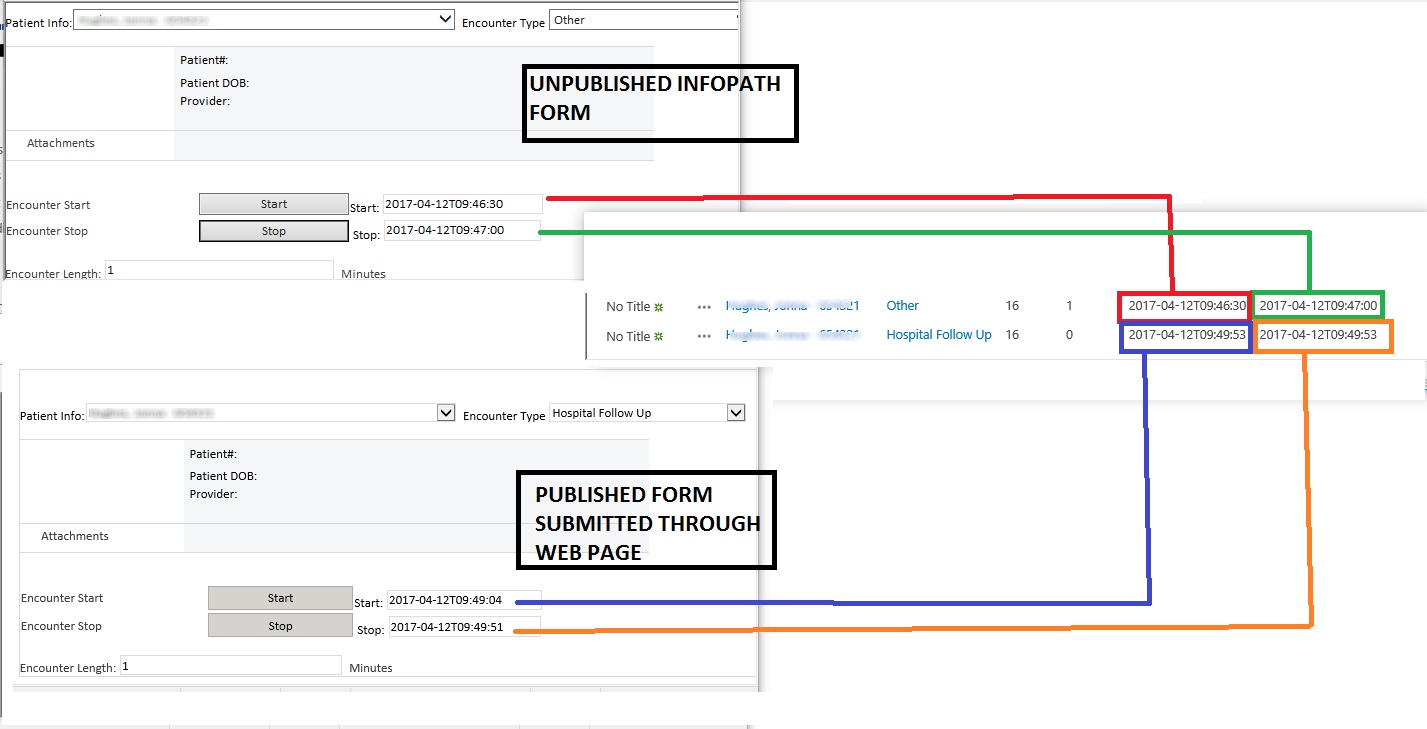
SEE ATTACHED SCREENSHOT
I have been doing this for years and this is the oddest issue I have ever had with Infopath (using 2013 for this)
I have a SharePoint list that I am customizing (the edit form) with Infopath. It is for call time tracking. The user can hit START button and a rule shoots Now() into the text field START then later, at the end of the call, they PRESS STOP button and it shoots the value for Now() into the text field STOP. The a third text field (DURATION) default value calculates the difference between START and STOP rounding to the closest minute. When previewed, the form works perfect and SUBMITS the correct data into the listing. After I publish the form and then run it from the SharePoint list webpage, the values for STOP and DURATION are wrong. The form magically duplicates the START value into the STOP field. So the calculated minutes are always “0” and the STOP time always matches the START time… All three fields are TEXTTYPE. The DURATION field Formula shown in pic. I have recreated the list as brand new and recreated every field with the same result. Used a different PC as well... I am going crazy. One other clue: When I run it in the browser and click START then STOP and then MANUALLY increase the STOP value by changing a 1 to a 2 etc, then the values are correct after it is submitted. It is as though the rule isnt putting the now() into the STOP field but it does put the right date and time in there. If it wasnt populating the field it should be BLANK after I submit it, it wouldn't just grab the START value arbitrarily.