Run existing field formula when checkbox is unchecked - InfoPath Dev
in

InfoPath Dev

Run existing field formula when checkbox is unchecked

Last post 02-08-2017 07:40 AM by Hilary Stoupa. 1 replies.
Page 1 of 1 (2 items)
Sort Posts: Previous Next
  • 02-07-2017 12:33 PM

    Run existing field formula when checkbox is unchecked

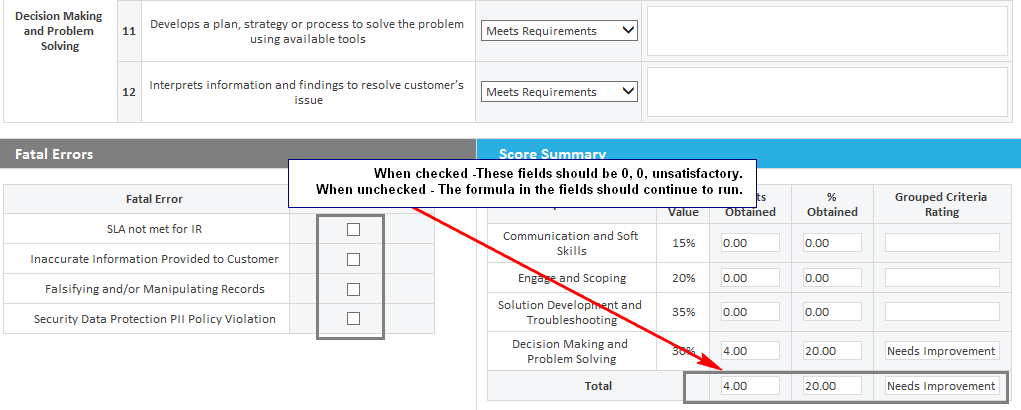
    Hello! I have an evaluation form in info path, the form has a set of attributes that are evaluated using a dropdown scale (1, 2, 3) and the score field is calculated based on this. So far so good. Now, there is a section where we evaluate 'fatal errors'; these are checkboxes, so if a fatal error is identified I have created a rule that overwrites a 0 in the calculated score (this also works) What I'm not able to set is the rule I need to reset the calculated score field when the checkbox is unchecked/false (when unchecked everything should go back to the formula set on this calculated score field) I have attach a screenshot. Thank you!!
    Filed under:
  • 02-08-2017 07:40 AM In reply to

    Re: Run existing field formula when checkbox is unchecked

     I would think you just need a rule on each of the checkbox fields that runs when the field is "false" to set things back? Have you tried that? Feel free to attach your form under Options in a reply if you'd like me to take a look. :)

    Hilary Stoupa

Page 1 of 1 (2 items)
Copyright © 2003-2019 Qdabra Software. All rights reserved.
View our Terms of Use.