Sharepoint list form ,Infopath 2010 username comparison - InfoPath Dev
in

InfoPath Dev

Sharepoint list form ,Infopath 2010 username comparison

Last post 08-17-2016 07:42 AM by Hilary Stoupa. 4 replies.
Page 1 of 1 (5 items)
Sort Posts: Previous Next
  • 08-16-2016 08:42 AM

    Sharepoint list form ,Infopath 2010 username comparison

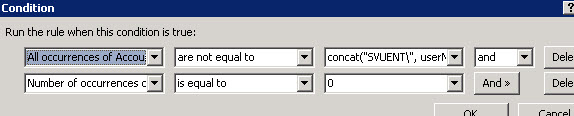
    Hello Everyone, I am having issues with my Info path form and i am very new to this. Its a list form and previously the rules were working. The rule is simple , am retrieving all occurrences of username from a list as secondary data connection and comparing with the current user. The screenshot is attached. All occurrences of account is are not equal to concat("SVUENT\",Username()) AND Number of occurrences of account id is equal to 0 This rule used to work earlier but now its not working any more. I am not sure what is wrong with this and i have tried searching a lot for this but didn't get any solution so far. This is only working for a single account id..that too only the first one. Not working for multiple occurrences. Any help would be greatly appreciated. Please let me know for any other details. Thanks, Deepak Panda
  • 08-16-2016 10:44 AM In reply to

    Re: Sharepoint list form ,Infopath 2010 username comparison

    I'm wondering if your second condition is the issue - is this the same account id as the first condition?
    Hilary Stoupa

  • 08-16-2016 10:40 PM In reply to

    Re: Sharepoint list form ,Infopath 2010 username comparison

    yes its the same account id as the first one.. i tried removing that but that too does not work
  • 08-17-2016 12:44 AM In reply to

    Re: Sharepoint list form ,Infopath 2010 username comparison

    I deleted the second condition and tried... it is working in preview mode now but when i publish it to share point list the rules just wont work and every field is coming as disabled :(
  • 08-17-2016 07:42 AM In reply to

    Re: Sharepoint list form ,Infopath 2010 username comparison

    If you'd like me to take a look at the form, feel free to attach it under the Options tab. Or maybe provide some additional screenshots - sorry, I'm having trouble guessing what the issue may be here.
    Hilary Stoupa

Page 1 of 1 (5 items)
Copyright © 2003-2019 Qdabra Software. All rights reserved.
View our Terms of Use.