I have a 2010 InfoPath form. On it the user can check the Salesperson
Person box. I have a rule that makes a
Sales Region text box a required field.
That works fine. I can’t figure out how to clear my rule when the user
unchecks the Salesperson box. My rule only works if another choice in the
mutlicheck box field is checked. My rule does not work by simply unchecking the
box.
Here are the details and the rules.
It has a multiple
choice text box. The data source is a SharePoint list list.
ID Display Text
19 Customer Service
20 Customer Service Supervisor
21 Marketing
22 Pricing Analyst
23 Salesperson
24 Sales Supervisor/Manager
44 Marketing/Sales Director
The above displays on my form in a Multi Selection List Box.
I have a text field called Rep Territory

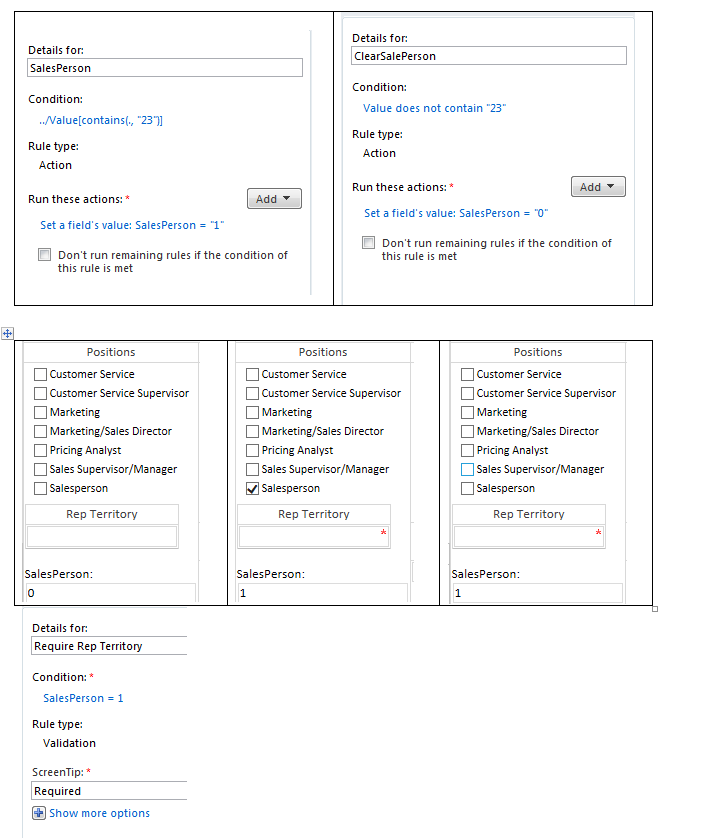
I have an additional Hidden Field to help with my Rule. I created a simple SalesPerson numeric field. Here is my Rule. In plain English. If Salesperson is checked
then Set SalesPerson to 1.

The first rule works fine. The second rule that should flip my
salesperson field to zero but it only
works if I click on another choice. If I simply uncheck the box nothing changes
in my SalesPerson field.
I have an additional Hidden Field to help with my Rule. I created a simple SalesPerson numeric field. Here is my Rule. In plain English. If Salesperson is checked
then Set SalesPerson to 1. If it is unchecked set SalesPerson to 0.

The user would have to manually click another choice in the
box for the SalesPerson change to zero and clear out my required field. I also
tried setting the postback to “Always”
in my multi check box properties but that does not have any affect.
I am looking for the right logic that allows a rule to
execute when a check box is unchecked in a multi check box field.
Thank you,
For those interested in my last rule to require the Rep
Territory to be filled out. Here it is.