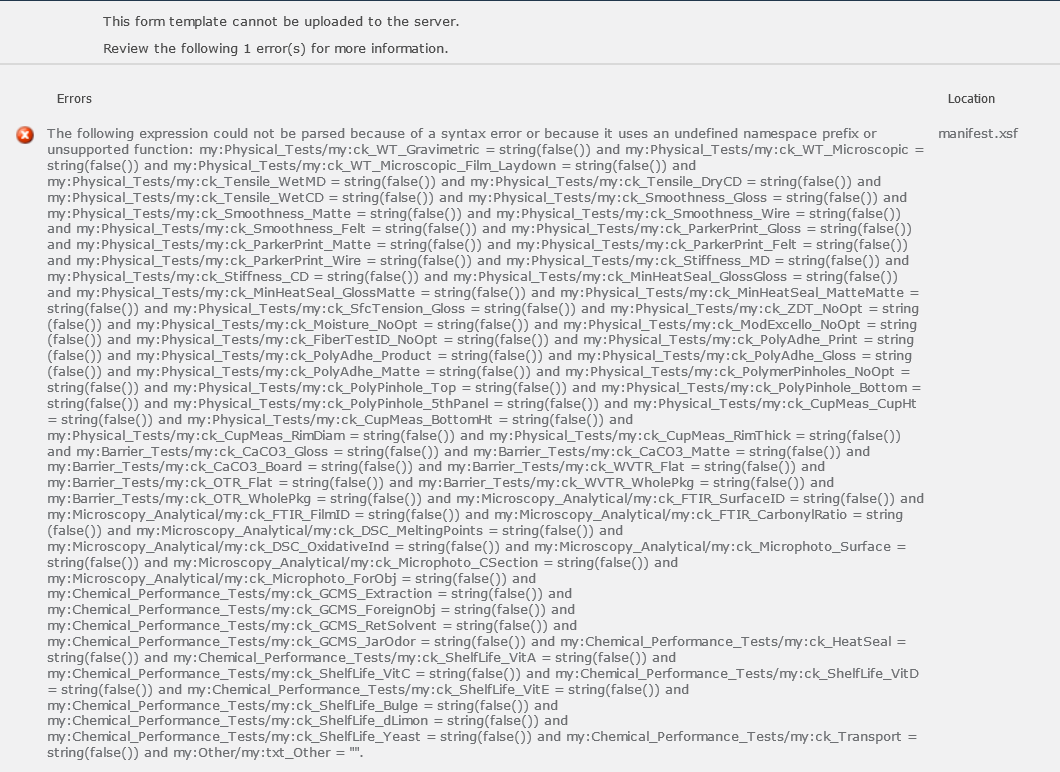
Hi, when publishing a web browser form, I get the error "...cannot be uploaded to the server...The following expression could not be parsed because of a syntax error or because it uses an undefined namespace prefix or unsupported function. I've looked at the other posts where people have received this and they don't seem to fit my situation, so I'm looking to see if anyone has any ideas.
I have 2 formulas where this error will show up when publishing (and the 2 formulas are replicated on each of 5 views). When I disable them all, the form publishes. The formulas are lengthy, but simple. One is looking at around 55 fields (checkboxes) to see if the values are all false (and if so, set a value on another field). The other formula does the opposite.. (if at least one is true, then set the field to a different value). In these formulas, there aren't any "fancy" functions, and although I'm using repeating tables elsewhere, these values aren't located in one.
Any suggestions? Could it be the length of the formula? Below is the formula where I'm checking for "False's". I'm attaching the error to this post (will add a second post with another screenshot - of the rule).
my:Physical_Tests/my:ck_WT_Gravimetric = string(false()) and my:Physical_Tests/my:ck_WT_Microscopic = string(false()) and my:Physical_Tests/my:ck_WT_Microscopic_Film_Laydown = string(false()) and my:Physical_Tests/my:ck_Tensile_WetMD = string(false()) and my:Physical_Tests/my:ck_Tensile_DryCD = string(false()) and my:Physical_Tests/my:ck_Tensile_WetCD = string(false()) and my:Physical_Tests/my:ck_Smoothness_Gloss = string(false()) and my:Physical_Tests/my:ck_Smoothness_Matte = string(false()) and my:Physical_Tests/my:ck_Smoothness_Wire = string(false()) and my:Physical_Tests/my:ck_Smoothness_Felt = string(false()) and my:Physical_Tests/my:ck_ParkerPrint_Gloss = string(false()) and my:Physical_Tests/my:ck_ParkerPrint_Matte = string(false()) and my:Physical_Tests/my:ck_ParkerPrint_Felt = string(false()) and my:Physical_Tests/my:ck_ParkerPrint_Wire = string(false()) and my:Physical_Tests/my:ck_Stiffness_MD = string(false()) and my:Physical_Tests/my:ck_Stiffness_CD = string(false()) and my:Physical_Tests/my:ck_MinHeatSeal_GlossGloss = string(false()) and my:Physical_Tests/my:ck_MinHeatSeal_GlossMatte = string(false()) and my:Physical_Tests/my:ck_MinHeatSeal_MatteMatte = string(false()) and my:Physical_Tests/my:ck_SfcTension_Gloss = string(false()) and my:Physical_Tests/my:ck_ZDT_NoOpt = string(false()) and my:Physical_Tests/my:ck_Moisture_NoOpt = string(false()) and my:Physical_Tests/my:ck_ModExcello_NoOpt = string(false()) and my:Physical_Tests/my:ck_FiberTestID_NoOpt = string(false()) and my:Physical_Tests/my:ck_PolyAdhe_Print = string(false()) and my:Physical_Tests/my:ck_PolyAdhe_Product = string(false()) and my:Physical_Tests/my:ck_PolyAdhe_Gloss = string(false()) and my:Physical_Tests/my:ck_PolyAdhe_Matte = string(false()) and my:Physical_Tests/my:ck_PolymerPinholes_NoOpt = string(false()) and my:Physical_Tests/my:ck_PolyPinhole_Top = string(false()) and my:Physical_Tests/my:ck_PolyPinhole_Bottom = string(false()) and my:Physical_Tests/my:ck_PolyPinhole_5thPanel = string(false()) and my:Physical_Tests/my:ck_CupMeas_CupHt = string(false()) and my:Physical_Tests/my:ck_CupMeas_BottomHt = string(false()) and my:Physical_Tests/my:ck_CupMeas_RimDiam = string(false()) and my:Physical_Tests/my:ck_CupMeas_RimThick = string(false()) and my:Barrier_Tests/my:ck_CaCO3_Gloss = string(false()) and my:Barrier_Tests/my:ck_CaCO3_Matte = string(false()) and my:Barrier_Tests/my:ck_CaCO3_Board = string(false()) and my:Barrier_Tests/my:ck_WVTR_Flat = string(false()) and my:Barrier_Tests/my:ck_OTR_Flat = string(false()) and my:Barrier_Tests/my:ck_WVTR_WholePkg = string(false()) and my:Barrier_Tests/my:ck_OTR_WholePkg = string(false()) and my:Microscopy_Analytical/my:ck_FTIR_SurfaceID = string(false()) and my:Microscopy_Analytical/my:ck_FTIR_FilmID = string(false()) and my:Microscopy_Analytical/my:ck_FTIR_CarbonylRatio = string(false()) and my:Microscopy_Analytical/my:ck_DSC_MeltingPoints = string(false()) and my:Microscopy_Analytical/my:ck_DSC_OxidativeInd = string(false()) and my:Microscopy_Analytical/my:ck_Microphoto_Surface = string(false()) and my:Microscopy_Analytical/my:ck_Microphoto_CSection = string(false()) and my:Microscopy_Analytical/my:ck_Microphoto_ForObj = string(false()) and my:Chemical_Performance_Tests/my:ck_GCMS_Extraction = string(false()) and my:Chemical_Performance_Tests/my:ck_GCMS_ForeignObj = string(false()) and my:Chemical_Performance_Tests/my:ck_GCMS_RetSolvent = string(false()) and my:Chemical_Performance_Tests/my:ck_GCMS_JarOdor = string(false()) and my:Chemical_Performance_Tests/my:ck_HeatSeal = string(false()) and my:Chemical_Performance_Tests/my:ck_ShelfLife_VitA = string(false()) and my:Chemical_Performance_Tests/my:ck_ShelfLife_VitC = string(false()) and my:Chemical_Performance_Tests/my:ck_ShelfLife_VitD = string(false()) and my:Chemical_Performance_Tests/my:ck_ShelfLife_VitE = string(false()) and my:Chemical_Performance_Tests/my:ck_ShelfLife_Bulge = string(false()) and my:Chemical_Performance_Tests/my:ck_ShelfLife_dLimon = string(false()) and my:Chemical_Performance_Tests/my:ck_ShelfLife_Yeast = string(false()) and my:Chemical_Performance_Tests/my:ck_Transport = string(false()) and my:Other/my:txt_Other = ""
SharePoint 2010, InfoPath 2010, qRules 6.1
thanks for any help!