Setting value On Certain rows on a repeating section with button outside - InfoPath Dev
in

InfoPath Dev

Setting value On Certain rows on a repeating section with button outside

Last post 02-18-2015 08:50 AM by Alejandrogp. 2 replies.
Page 1 of 1 (3 items)
Sort Posts: Previous Next
  • 02-17-2015 05:48 AM

    Setting value On Certain rows on a repeating section with button outside

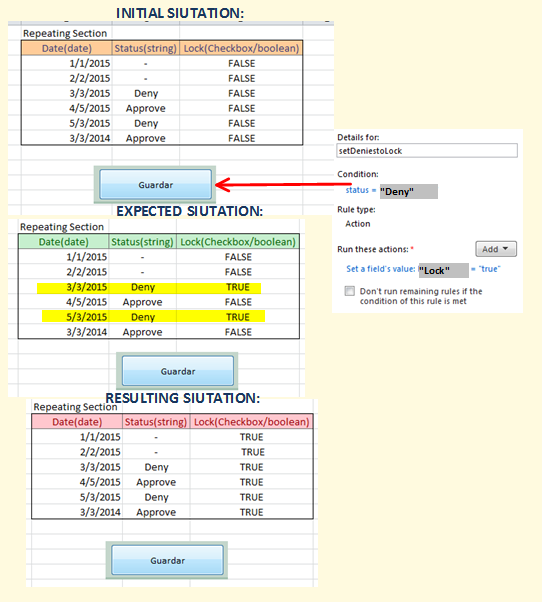
    Hello, I've been experimenting with infopath a few months ago, I'm very new to it, I'm more acquainted with Java and html...., i'm having a very hard time getting used on how to set rules for repeating elements into repeating sections as i can't seem to have control over each individual item as it would do with a programming/script language. I've an scenario where the user must save some entered dates in a repeating section, and change their status with a "Deny" or "Approve" flag. then when he finally saves with a save button ,"guardar", the rows that are on "Deny" status should set to TRUE in a Lock flag on that specific row of the repeating section. for that, i've used a rule on that button "guardar" outside the repeating section to setfield(lock) =true for every condition where status=deny is met. What i expect is that only rows on "deny" get a lock on "true" , what is really happening is , all rows , regardless of their status get a true flag. is there a workaround on this? or a more robust way to manage iterative structures? I've attached a explanatory file with the situation described above, any help/hints very appreciated , i've been stuck with this for days and days , don't know how to tackle this on infopath, thanks and Regards, Alejandro.
    Filed under:
  • 02-18-2015 07:33 AM In reply to

    Re: Setting value On Certain rows on a repeating section with button outside

    Hi Alejandro,

    I understand you would like to set the "Lock" column to true if the value under the status column is "Deny". For cases like this, I would recommend using a hidden column which is triggered by a button click. Here's how the approach should work:

    1. Add a action rule to the button which sets the hidden column to the value "go" (or any value just to trigger the next action below).
    2. Add a action rule to the hidden column to set the "Lock" column to true on the condition that "Status" = "Deny".
    3. Add an action rule to the button which sets the hidden column's value to blank - triggering the reset

    Hope this helps.

    Regards,

    Don Stephen Lambatin / Support Engineer
    Qdabra Software
  • 02-18-2015 08:50 AM In reply to

    Re: Setting value On Certain rows on a repeating section with button outside

    Hey Don , thanks for the promptly answer, positive , it works brilliantly! , this was driving nuts and couldn't devise the answer , thanks again for your help Regards, Alejandro.
Page 1 of 1 (3 items)
Copyright © 2003-2019 Qdabra Software. All rights reserved.
View our Terms of Use.