CopyTable functionality question - InfoPath Dev
in

InfoPath Dev

CopyTable functionality question

Last post 03-20-2013 05:01 PM by Hilary Stoupa. 5 replies.
Page 1 of 1 (6 items)
Sort Posts: Previous Next
  • 03-17-2013 03:51 PM

    CopyTable functionality question

    I can't seem to get my head around how to create this repeating table. We have 2 SharePoint lists. List A has a number of service items. List B stores the comments related to those service items, using the ID from List A to match them up. I would like to create a repeating table of List A items, with the related List B items listed directly below the specific List A item. So I easily created the List A repeating table. Then I added the List B repeating table within the List A table and tried to use a rule that if the ID in List B does not match the ID of List A, hide it. I was hoping it would show Item 1 in List A, with all items related to it from List B, the show Item 2 in List A, with all items related to it from List B, and so on. Unfortunately I don't think it is grabbing the ID using the rule, as everything is blank. I can add a button which grabs the ID from the row the button was on, but I just want to show everything. Not sure if I've adequately explained this, but if I have, any ideas? I thought about copying each secondary list to the infopath form, but I'm not sure if this is a solution (as I've not worked with the CopyTable command before).
  • 03-18-2013 08:01 AM In reply to

    Re: CopyTable functionality question

    You might be able to use CopyTable, with the second CopyTable command using some sort of filter to ensure grabbing the correct data from List B.

    Though I haven't tried the scenario myself, I get the feeling that it might be better to use an iteration to copy this data. Basically, your form would count the number of List A rows, insert them into the main data source, then populate them one by one (including the filtered data from List B). If you opt to choose this method, here's a good place to start:

    http://www.infopathdev.com/files/folders/qrules/entry58577.aspx

    Ernesto Machado
    Qdabra® Software/ InfoPathDev.com
    The InfoPath Experts – Streamline data gathering to turn process into knowledge.™


  • 03-18-2013 09:12 AM In reply to

    Re: CopyTable functionality question

    Thanks Ernesto. I did see this and was hoping there was some method I didn't know about that was really easy!! Anyways, I will work on my report using CopyTable in this fashion as you've said it should work, just didn't want to do it if in the end it wasn't going to work.
  • 03-18-2013 08:44 PM In reply to

    Re: CopyTable functionality question

    Would there be a coding solution to this? Something along the lines of an onchange event when each row of the repeating table changes?
  • 03-20-2013 04:04 PM In reply to

    Re: CopyTable functionality question

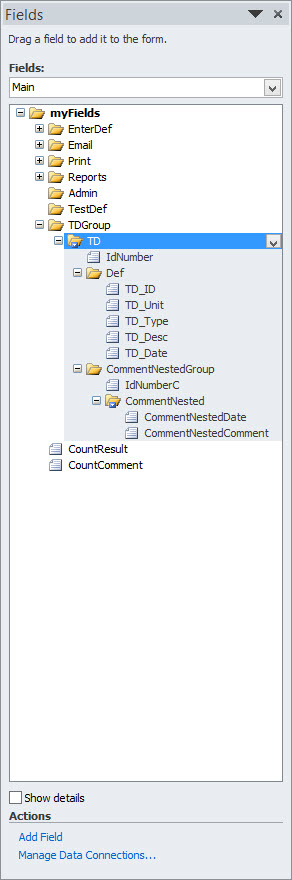
    OK, gave this a shot using the PDF instructions and Hilary's Video. Trying to nest a repeating table within a repeating table. Not working, so here is the basic structure: 1. Table 1 is working correctly, ie counting list from SharePoint, deleting all rows, inserting correct number of rows using count function, and populating the list. Yay! 2. Added a second repeating table within the first repeating table, which is what I want to populate in a similar fashion to Table 1. 3. Added the Table 2 command after setting the Table 1 fields, and before the Decrement Count command. The commands used are Count Table 2 using a 2nd XML file, Delete existing rows, Insert appropriate rows, Set fields, and Decrement Count2 (Table 2), then ends with the Decrement of Count (Table 1). These commands are attached the the Table 1 repeating table, with no commands actually attached to the Table 2 repeating table. The hope is that it would try to populate the nested Table 2 after inserting each instance of Table 1. I don't get any errors, but the nested Table 2 adds and empty row to the first instance, and no rows for the remaining instances. This may be impossible to follow with my explanation, but any suggestions? I've attached the Data Source structure. Cam
  • 03-20-2013 05:01 PM In reply to

    Re: CopyTable functionality question

     Care to share your form?

    Hilary Stoupa

Page 1 of 1 (6 items)
Copyright © 2003-2019 Qdabra Software. All rights reserved.
View our Terms of Use.