Submit To SharePoint List not executing - InfoPath Dev
in

InfoPath Dev

Submit To SharePoint List not executing

Last post 02-18-2013 05:27 PM by jasonwhitestl. 3 replies.
Page 1 of 1 (4 items)
Sort Posts: Previous Next
  • 02-17-2013 03:18 PM

    Submit To SharePoint List not executing

    When executing the SubmitToSharePointList command, it appears the command is not firing. I have added both the Success, and Error nodes to my form, and receive neither a success or error message. I have created another simple form, and can execute the command successfully.

    The command I'm executing: SubmitToSharePointList /submit=Submit

     I have attached a copy of my mapping file


    thanks,

    Jason


  • 02-17-2013 03:20 PM In reply to

    Re: Submit To SharePoint List not executing

     Attached a copy of the form

  • 02-17-2013 05:50 PM In reply to

    Re: Submit To SharePoint List not executing

    Usually when I see this, qRules has been disabled because custom code was unintentionally added to the form. Easy test is to put the Command and Result nodes on the form, preview and type in GenerateGuid for the command - do you get a GUID in the Result node?

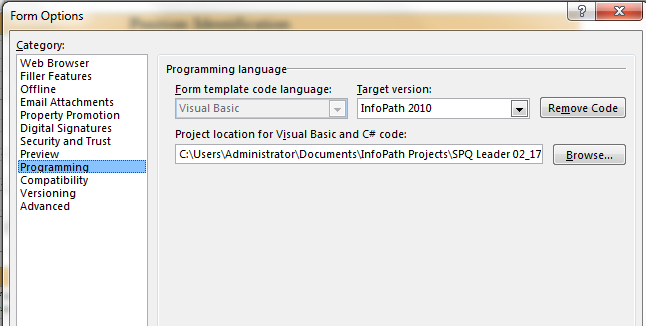
    When I look at your form, it does appear code has been added - see screenshot attached. If it is not intentional, click the Remove Code button to remove it. If it is intentional, there is a document here on how to use qRules with your own custom code. The document has not been updated for the new dev environment with IP 2013, so let me know if you are using 2013 and the custom code is intentional.

    Hilary Stoupa

  • 02-18-2013 05:27 PM In reply to

    Re: Submit To SharePoint List not executing

     It was not intentionally added, so I removed it. Your suggestion worked, and now the form submit successfully.

     I have not had a chance to work with SP2013 and InfoPath yet, but it will be coming in the near future.


    thank you for your help,

    Jason

Page 1 of 1 (4 items)
Copyright © 2003-2019 Qdabra Software. All rights reserved.
View our Terms of Use.