Requires Domain Permissions! - InfoPath Dev
in

InfoPath Dev

Requires Domain Permissions!

Last post 02-07-2013 01:33 AM by mtwelve. 5 replies.
Page 1 of 1 (6 items)
Sort Posts: Previous Next
  • 09-05-2012 09:04 AM

    Requires Domain Permissions!

    Hello, I'm pretty sure its been asked before and though I would love a solution I will be happy with some ideas for troubleshooting. We have a form published to a library on SharePoint. Users can open a new form at the library no problem. A link to the template file will not work and will through the horrible 'domain permissions required' message. The form is published with domain level specifically granted. The site is in the local intranet, both FQDN and not. The form can be openend from anywhere if you append "OpenIn=Browser" but that is not currently appropriate. Help!
  • 09-05-2012 11:48 AM In reply to

    Re: Requires Domain Permissions!

     Have you tried to change in Form Library Settings > Default open behavior for browser-enabled documents: to

    • Open in the browser 

    from default: Use the server default (Open in the client application)?

    Gennady Vanin (Novosibirsk) --- Геннадий Ванин (Новосибирск)
  • 09-06-2012 01:08 AM In reply to

    Re: Requires Domain Permissions!

    That wont affect the links to the form, which is the issue, as for them to open in the browser you simply add "?OpenIn=Browser" at the end of the link for it to open in the browser. They have been designed to open in the filler application and so I will need to make that work for now. Thanks
  • 09-06-2012 04:43 AM In reply to

     Sorry, I do not understand what you were asking and tried to guess what was your problem in my reply.

    You are writing that you were able to open in browser the forms that "have been designed to open in the filler application"

    AFAIK, Infopath Filler Form cannot be opened in browser while Web Browser Form can be opened both in browser and in Infopath Filler

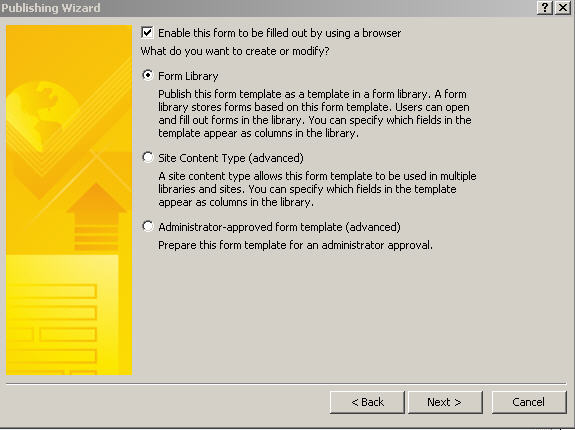
    The publishing wizard of  Web Browser Form presents an option:

    • Enable this form to be filled out by using a browse

    which is absent in publishing wizard of  Infopath Filler Form

    And if to try opening an Infopath Filler Form in browser, the error is:

    • This form template is not currently browser enabled 
    which is quite logical considering that client forms have richer set of features not supported in browser forms.
    Gennady Vanin (Novosibirsk) --- Геннадий Ванин (Новосибирск)
  • 09-06-2012 08:08 AM In reply to

    Re: Requires Domain Permissions!

    Hi - when you say a link to the form, do you mean a link someplace other than the library? Is this 2010 or 2007? Try adding noredirect=true to your link - does that help at all?

    Hilary Stoupa

  • 02-07-2013 01:33 AM In reply to

    Re: Requires Domain Permissions!

    The links were from one site to the template.xsn in the actual form libraries. The arrangement is as follows: Root Site Site A Form Library X Site B Page with links to template.xsn of Form Library X This is SharePoint 2010 and unfortunately 'noredirect' didn't work. We have stopped hot linking to the form templates and instead send them to a 'My Documents' view but the hot links were very useful. Any ideas?
Page 1 of 1 (6 items)
Copyright © 2003-2019 Qdabra Software. All rights reserved.
View our Terms of Use.