Display Infopath selected items from multi-selection list box in a repeated section/table textbox - InfoPath Dev
in

InfoPath Dev

Display Infopath selected items from multi-selection list box in a repeated section/table textbox

Last post 01-10-2013 12:59 AM by matt365uk. 7 replies.
Page 1 of 1 (8 items)
Sort Posts: Previous Next
  • 12-18-2012 03:42 AM

    Display Infopath selected items from multi-selection list box in a repeated section/table textbox

    I require a solution or guidance on the following scenario: I have a multi-selection list box which displays a list of services from a SharePoint list. What i need to do is when an item is selected I need it to insert the value into a repeating table/section text-box, so for each item selected it will insert that value into a new text-box. Please find attached a image of what i'm trying to achieve. Many thanks for any help, in advance. Matt
  • 12-18-2012 04:05 AM In reply to

    Re: Display Infopath selected items from multi-selection list box in a repeated section/table textbox

    I think this should be pretty simple.  The MSLB is already bound to a repeating field, so all you need to do is create a repeating section with that same repeating field, and inside the section, you can type the Section text and add a text box yet again bound to that same field.  You may need to filter the repeating section to hide rows where the field is blank.

    Do you have a requirement to edit the textboxes that are displayed, or just show them?

    Jimmy Rishe / Software Developer / Microsoft MVP
    Qdabra Software
  • 12-18-2012 06:36 AM In reply to

    Re: Display Infopath selected items from multi-selection list box in a repeated section/table textbox

    Hi Jimmy, Thanks for your quick response. No there is no requirement to edit them, just show them.
  • 01-02-2013 03:07 AM In reply to

    Infopath 2010 Repeating table containing 2 additional non repeated textboxes in each repeated row

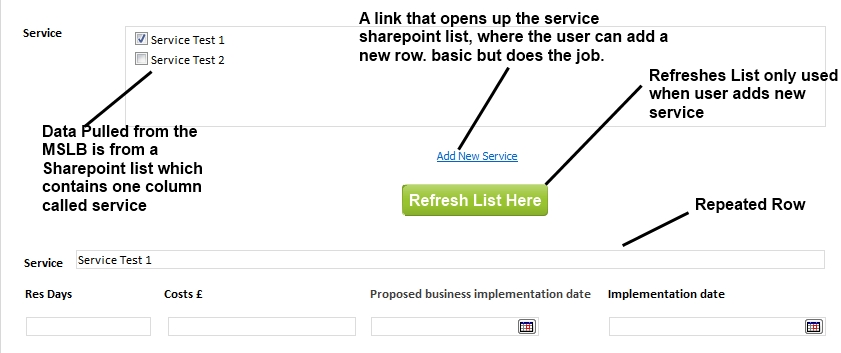
    Hi Jimmy, Firstly Happy New Year! Thanks for your help I've returned from Holiday and implemented your suggestion which worked a treat. I need some help on expanding it a bit further if that's ok. The revised scenario: Within the repeating section, I need to have 2 additional textboxes & two date textboxes but they will need to be unique for each row within the repeated row. As you can see from the attached image I currently have the Service textbox working correctly, but the 4 textboxes below are duplicating themselves and any corrections made to one of the textboxes it updates that textbox for each repeated row with the same value. Any suggestions? (Hope that makes sense!)
  • 01-03-2013 01:20 PM In reply to

    Re: Infopath 2010 Repeating table containing 2 additional non repeated textboxes in each repeated row

    This step is considerably trickier.  The textboxes need to be part of the repeating structure in order to have unique values in each row, but an MSLB won't allow you to do that for the repeating field that binds to the MSLB.

    Is there a known limit to the number of items in the MSLB? The only codeless approach I can think of is to have a repeating group prefilled with N blank rows, and populated with all the available values when the form is loaded.  Then the rows could be shown or hidden based on which values were checked.  What is your situation, specifically?  Does that sound like it might work?

    Jimmy Rishe / Software Developer / Microsoft MVP
    Qdabra Software
  • 01-04-2013 12:48 AM In reply to

    Re: Infopath 2010 Repeating table containing 2 additional non repeated textboxes in each repeated row

    In the short-term it could be a fix, but the user can add services to the Sharepoint list when they need so in the future this could become an issue.

    Just to give a bit of background on the overall project:

    Sharepoint where I work in local government is very new, 4 months kind of new & I'm about that skill wise in it at the moment but learning quickly.

    This particular project will be used by a team within the sub-department I work in, but it could very quickly go department wide and then to every other department within the organisation. The service list is simply the name of all the teams at the moment of my current sub-department which is around 15 teams but then it were to go department wide it could 100 + per department.

    I'm happy if you know a code way or another way to achieve this as long as long as the data input is grouped together i.e. a chosen service which then has next to or underneath it the for additional text & date boxes.

    The attached picture is what I current have in place on the form:

  • 01-04-2013 04:50 AM In reply to

    Re: Infopath 2010 Repeating table containing 2 additional non repeated textboxes in each repeated row

    What kind of SharePoint are you using at the moment? If you're able to use code, it should be possible to accomplish this with qRules.  You would create another repeating group with a service name field and any others you need, and place a rule on the MSLB field like this:

    Condition: MSLBField is not empty AND not(OtherRepeatingGroup[ServiceName = current()])
    Actions:

    qRules Command - Insert /parent=/path/to/otherRepeatingGroupParent /child=OtherRepeatingGroup

    qRules Command - concat("SetValue /xpath=/path/to/otherRepeatingGroupParent/OtherRepeatingGroup[last()]/ServiceName /value=", .)

    Jimmy Rishe / Software Developer / Microsoft MVP
    Qdabra Software
  • 01-10-2013 12:59 AM In reply to

    Re: Infopath 2010 Repeating table containing 2 additional non repeated textboxes in each repeated row

    Thanks for your assistance,I've managed to finally resolve this issue with the following code on the change event of the MSLB control Dim doc As New XmlDocument() 'Repeated Table Group Dim group As XmlNode = doc.CreateElement("group3", NamespaceManager.LookupNamespace("my")) 'Repeated Table Field Dim field As XmlNode = doc.CreateElement("field12", NamespaceManager.LookupNamespace("my")) Dim node As XmlNode = group.AppendChild(field) Dim sb As New System.Text.StringBuilder() Dim iterator As XPathNodeIterator = MainDataSource.CreateNavigator().[Select]("/my:myFields/my:group1/my:MSLB", NamespaceManager) While iterator.MoveNext() Dim node1 As XPathNavigator = iterator.Current Dim children As XPathNodeIterator = node1.SelectChildren(XPathNodeType.All) While children.MoveNext Dim child As XPathNavigator = children.Current node.InnerText = child.Value End While End While doc.AppendChild(group) MainDataSource.CreateNavigator().SelectSingleNode("/my:myFields/my:group2", NamespaceManager).AppendChild(doc.DocumentElement.CreateNavigator()) The final thing, I wish to achieve is when an item is remove from the MSLB I want it to hide the repeated table row with the same name in the textbox.
Page 1 of 1 (8 items)
Copyright © 2003-2019 Qdabra Software. All rights reserved.
View our Terms of Use.