Browser Form That Collects Feedback on Images in SharePoint Image Library - InfoPath Dev
in

InfoPath Dev

Browser Form That Collects Feedback on Images in SharePoint Image Library

Last post 12-26-2012 12:26 AM by Mel Clemente. 1 replies.
Page 1 of 1 (2 items)
Sort Posts: Previous Next
  • 11-08-2012 06:55 AM

    Browser Form That Collects Feedback on Images in SharePoint Image Library

    Hi

    I thought that this would be simple.  I could load up a bunch of images into a SharePoint image library, direct users to a modified version of the slidshow.aspx view that would allow them to see the images (one at a time), collect feedback from them and allow them to click "save and next" to go to the next image.  Not so easy.

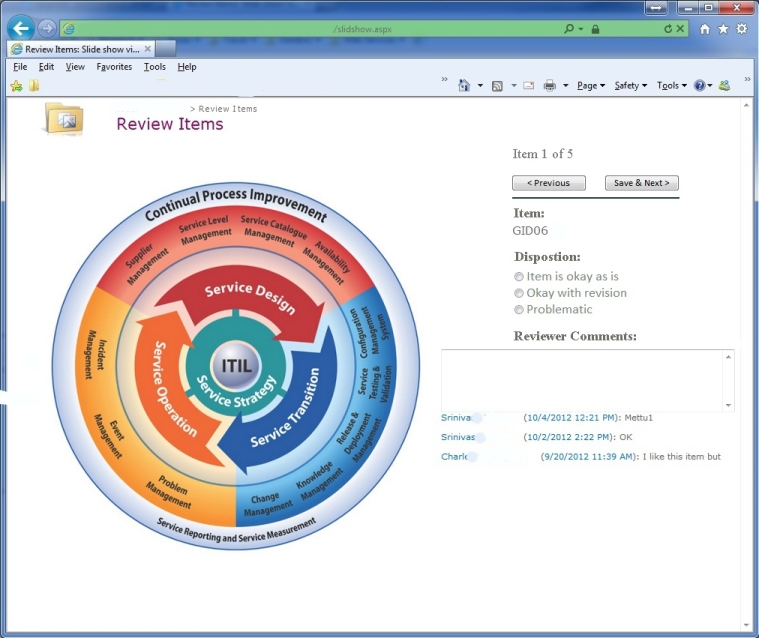
    I designed a mock-up of what I though it would look like (see proposedview1.jpg) in SharePoint in this modified view.  However I can't figure out how to do it.

    Can it be done in InfoPath?  Can a Web-based InfoPath form display the image, collect feedback (fields mapped to SharePoint fields) and then allow the user to save and go to the next image without leaving the InfoPath form?  The comments box must show the comments from the other users.

    Thanks!

  • 12-26-2012 12:26 AM In reply to

    Re: Browser Form That Collects Feedback on Images in SharePoint Image Library

    Sounds simple, indeed. I imagine having a receive data connection to the image library, probably set the query field/s so that the form knows which image to display each time. Clicking Next submits data back to the SharePoint list, and then queries for the next image, comments, etc.
    Mel Clemente
    Qdabra® Software/ InfoPathDev.com
    The InfoPath Experts – Streamline data gathering to turn process into knowledge.™

Page 1 of 1 (2 items)
Copyright © 2003-2019 Qdabra Software. All rights reserved.
View our Terms of Use.