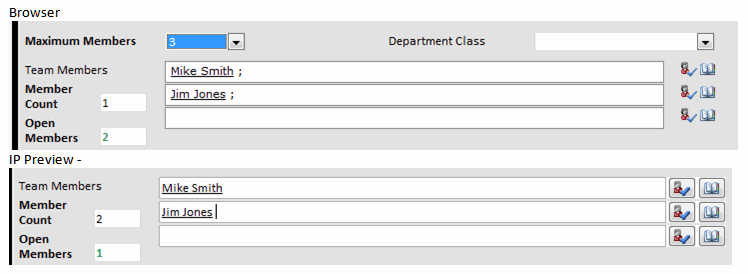
Hi everyone, I have a strange problem,
I have a IP Browser form that has 10 seperate people picker fields. (requirement of the form, cannot use repeating table)
I have a concatenate field that is setup to hold the list of these 10 seperate fields seperated by ";".
I have another field on the form(countmembers) that counts the number of members using the count function on the concatenate field. This total members field should show how many total members are entered into the fields.(non blank fields)
If I preview the form from the IP designer eveything works fine. When I publish the form to SharePoint and open the form with a browser, the count function does not count the first people picker field when a value is added.
The concat field updates the total members field with a rule that contains the following which runs when the field changes:
Set a fields value CountMembers =
count(DisplayName[. != ""] | DisplayName[. != ""] | DisplayName[. != ""] | DisplayName[. != ""] | DisplayName[. != ""] | DisplayName[. != ""] | DisplayName[. != ""] | DisplayName[. != ""] | DisplayName[. != ""] | DisplayName[. != ""]). I have also tried count(DisplayName | Display Name | Display Name....) [. !=""]).
When I add a member to the first people picker field using a browser, the count members stays at 0. If I use the preview in the IP designer it changes to 1 and works perfectly.
I added an image showing the form in a browser and in the IP Preview.