How to display a previous view within current view (without switching) - InfoPath Dev
in

InfoPath Dev

How to display a previous view within current view (without switching)

Last post 03-31-2014 08:23 PM by dsanchez. 2 replies.
Page 1 of 1 (3 items)
Sort Posts: Previous Next
  • 03-27-2014 10:03 PM

    How to display a previous view within current view (without switching)

    Hi all, currently having a brainless Friday and thought there's no better place to ask for help that our trusty friends here @ infopathdev :)

    Was hard to describe the problem within the subject but I will try my best to describe it below.

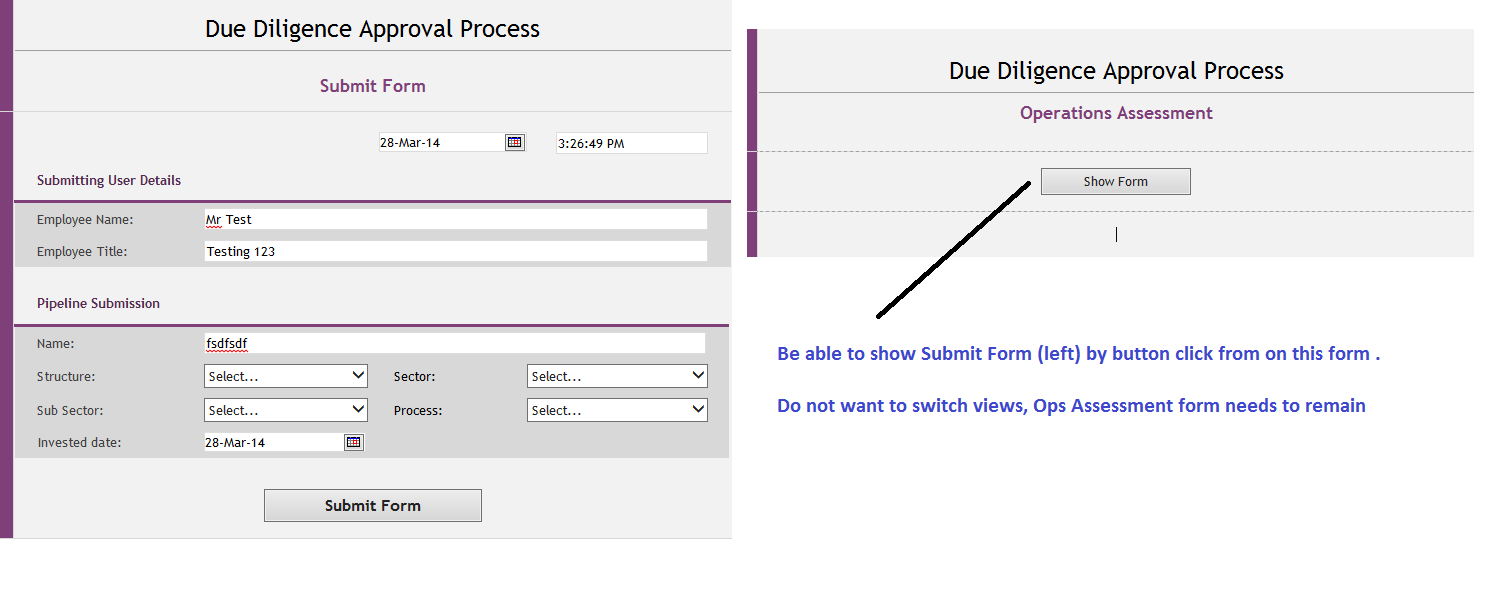
    I am effectively trying to display a previous view (Submit Form) on another view (Ops Assessment) from a button click, but without switching the entire view. Using the switch view on the button click, it obviously changes the entire view which is not what I am trying to do. I want to keep the Ops Assessment view as it is, with an inclusion of the Submit Form, if the user wishes to review it.

    Is there a way of doing this? I believe the switch view method will not work, so does anyone have any suggestions as to do this?

    I have attached an image of the 2 views, if it makes it any easier to decipher what i want to do :) 

    As always, many thanks

    Sanchez

  • 03-31-2014 08:15 PM In reply to

    Re: How to display a previous view within current view (without switching)

    Hi Sanchez,

    Cases like this, I would suggested using a boolean field and name it such as isSubmitted or isNotActive. Have this boolean triggered by a certain condition or rule, and the use the fields for hiding and/or showing sections of a page. Would this approach work for you? Let me know if this helps.

    Regards, 

    Don Stephen Lambatin / Support Engineer
    Qdabra Software
  • 03-31-2014 08:23 PM In reply to

    Re: How to display a previous view within current view (without switching)

    Hey Don, yeh I've used this approach in the end.

    Just utilising the sections and hiding/showing the fields based off the user choice. It's really not what I wanted to do, but guess its the best alternative. Unfortunately as there as duplicated fields in some sections, I am getting the control stores duplicate data. (hence why i really didnt want to use this approach)

Page 1 of 1 (3 items)
Copyright © 2003-2019 Qdabra Software. All rights reserved.
View our Terms of Use.