Infopath 2007, repeating table to act as multi-select list box - InfoPath Dev
in

InfoPath Dev

Infopath 2007, repeating table to act as multi-select list box

Last post 02-29-2012 02:56 PM by Anson Hidajat. 1 replies.
Page 1 of 1 (2 items)
Sort Posts: Previous Next
  • 02-22-2012 08:42 AM

    Infopath 2007, repeating table to act as multi-select list box

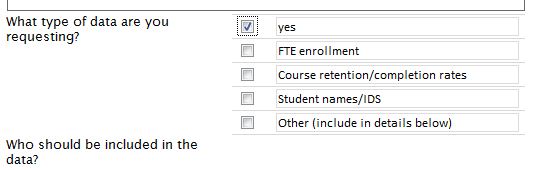
    I am currently working on a project that I am needing a multi-select list box, however since I am using a browser-enabled form, I don't have that option. So I have created a repeating table that is bound to my secondary data source and have a checkbox field and a textbox field. My problem is when the check box is check (or even unchecked) the textbox field changes from the item (from the data source) to either yes or no. I DON'T want that to happen. Can someone help me please. I have uploaded a picture (screen shot) of the form. Where it says "yes" it was "Headcount". Is there a way to have the check box checked or unchecked and NOT change the textbox field?
  • 02-29-2012 02:56 PM In reply to

    Re: Infopath 2007, repeating table to act as multi-select list box

    Looks like you have the checkbox and textbox bound to the same fields.  If you separate these into two different fields, then enabling the checkbox won't change the value in the other control.
    Anson Hidajat
    Qdabra® Software/ InfoPathDev.com
    The InfoPath Experts – Streamline data gathering to turn process into knowledge.™

Page 1 of 1 (2 items)
Copyright © 2003-2019 Qdabra Software. All rights reserved.
View our Terms of Use.