conditional formatting for Richtextbox - InfoPath Dev
in

InfoPath Dev

conditional formatting for Richtextbox

Last post 12-08-2011 05:55 AM by ErnestoM. 1 replies.
Page 1 of 1 (2 items)
Sort Posts: Previous Next
  • 12-08-2011 04:35 AM

    conditional formatting for Richtextbox

    hi, 

    I'm using the Richtextbox in infopath 2007. i need to set conditional formatting as boolean value i.e "field name" "is equal to" "False".but i couldnt select boolean values in dropdown. there is only text,number option etc.,

    Any suggestions please.

  • 12-08-2011 05:55 AM In reply to

    Re: conditional formatting for Richtextbox

    Hi-

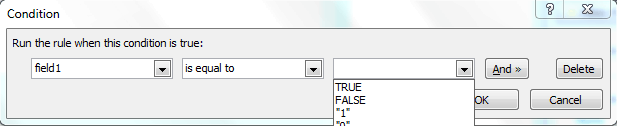
    Are you talking about the third dropdown in the conditional formatting screen?

    If the field selected in the first dropdown is a boolean data type field, then the third dropdown will show the boolean options (false/true).

    Otherwise, if the field is NOT boolean data type, then the third dropdown won't show the boolean options.

    Hope this helps!

    Ernesto Machado
    Qdabra® Software/ InfoPathDev.com
    The InfoPath Experts – Streamline data gathering to turn process into knowledge.™


Page 1 of 1 (2 items)
Copyright © 2003-2019 Qdabra Software. All rights reserved.
View our Terms of Use.