Getting "The form has been closed." message on screen when closing web based form - InfoPath Dev
in

InfoPath Dev

Getting "The form has been closed." message on screen when closing web based form

Last post 05-14-2010 02:37 PM by ErnestoM. 1 replies.
Page 1 of 1 (2 items)
Sort Posts: Previous Next
  • 05-14-2010 09:20 AM

    • g21cincy
    • Top 150 Contributor
    • Joined on 10-20-2008
    • Cincinnati, OH
    • Posts 64

    Getting "The form has been closed." message on screen when closing web based form

    I have successfully loaded other web based forms on my SharePoint site and when I close them I'm directed back to the page where I selected the form. On this new form I have uploaded, when I go to close the form I get a "The form has been closed." message at the top of the page. Any ideas?

  • 05-14-2010 02:37 PM In reply to

    Re: Getting "The form has been closed." message on screen when closing web based form

    I believe SharePoint will direct you back to the URL from which the form was opened. So if you open from a form library, submit, form closes, then you are directed back to the form library.

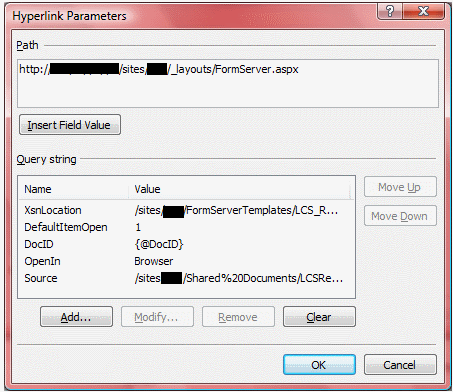
    Concerning your issue, I've run into this when creating data views that open an XSN; the workaround in that case is to provide a source parameter in the URL, so that Sharepoint knows where to redirect users.

    Ernesto Machado
    Qdabra® Software/ InfoPathDev.com
    The InfoPath Experts – Streamline data gathering to turn process into knowledge.™


Page 1 of 1 (2 items)
Copyright © 2003-2019 Qdabra Software. All rights reserved.
View our Terms of Use.