Dynamic Stock list, cascading field help - InfoPath Dev
in

InfoPath Dev

Dynamic Stock list, cascading field help

Last post 04-24-2017 07:26 AM by Hilary Stoupa. 7 replies.
Page 1 of 1 (8 items)
Sort Posts: Previous Next
  • 04-17-2017 11:57 PM

    Dynamic Stock list, cascading field help

    Hello,

    I'm working on an dynamic stock system on sharepoint with Infopath, but I cannot figure out the cascading fields in Infopath. ( i tought cascading fields was also possible within sharepoint but this area is grey, i cannot select tables?). Anyway,

    I created 5 tables on sharepoint:
    - locations
    - products
    - users (there is a lookup column with departments)
    - departments
    - stock (here is product (lookup) and location (lookup) and Amount

    I created a form where a user can request an item. When selecting the item there should be a choice of the locations. The same goes with the user, some users can request for multiple departments.
    So far I have this in the field 'location':

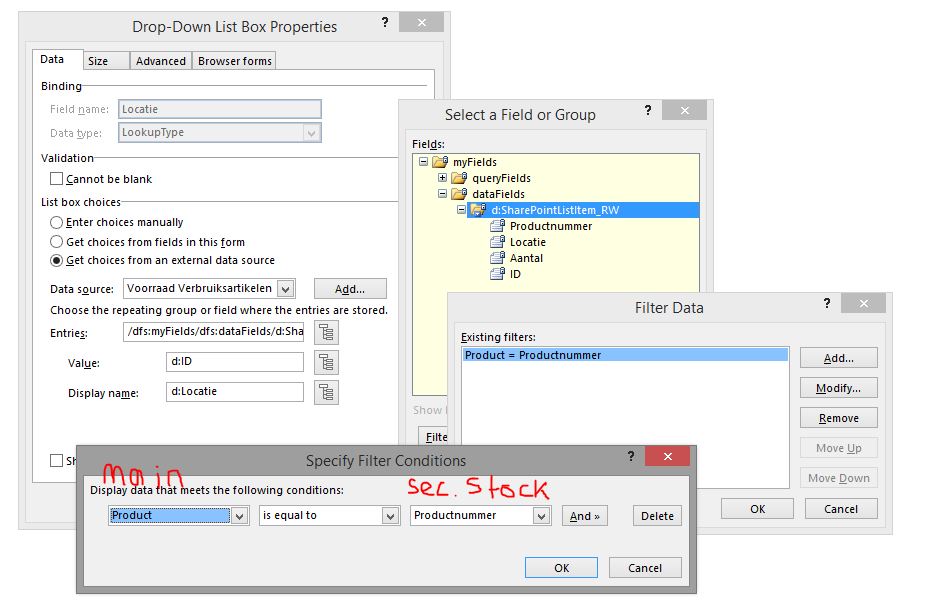
    Data source: stock (product - location - amount - ID). On entries I have the following: Filter data on 'Product (from main)  = Productnumber (from stock). What I get is that the ID is shown in the location field, after selecting a product but I cannot get the name of the location.

    Do I need to add another filter level? I think i'm on the right track, because it is filtering the right locations, but it shows the ID from the locations.


    Help is much appreciated,

    With regards,

    Ramon


  • 04-19-2017 01:34 AM In reply to

    Re: Dynamic Stock list, cascading field help

     I'm sorry, I am using Infopath 2013 and I think it should have been in the sharepoint forum instead of Infopath 2010. Could this be removed to the right forum?

  • 04-19-2017 07:20 AM In reply to

    Re: Dynamic Stock list, cascading field help

    Hi - in your formula editor dialog, can you click the Edit XPath checkbox and paste the XPath into a reply? Or attach your form to a reply under Options & I'll see if I can give you a hand. :)
    Hilary Stoupa

  • 04-19-2017 11:25 PM In reply to

    Re: Dynamic Stock list, cascading field help

     Hello Hilary, It's a pleasure to get a response from you. Most of my knowledge of Infopath I got from your responses on this forum.

    I don't really have a formula, it only says d:productnummer (this is the productnumber from the Stocklist). I would like to understand what I'm missing.

    With regards,

    Ramon


  • 04-20-2017 10:54 AM In reply to

    Re: Dynamic Stock list, cascading field help

    Okay, I think you need in your filter to select the secondary data source productnummer first, then in in the third dropdown, select the main data source product. We want to see InfoPath using "current()" in the filter, and it will probably figure that out on its own.
    Hilary Stoupa

  • 04-24-2017 03:37 AM In reply to

    Re: Dynamic Stock list, cascading field help

    Well, Infopath didn't found it out on it's own, neither did I. I'm also not understanding how it works, I have tried many possible ways. I couldnt find a good blog/article/forupost that explains to me why it returns a ID instead of the 'location'.

    In the picture I showed the connection between my tables and the formula, as you explained (Productnumber (from secundaire dataconnection: "Stock") is equal to "Product" (from main connection).


  • 04-24-2017 05:59 AM In reply to

    Re: Dynamic Stock list, cascading field help

     I found it. I was using the wrong table. Instead of the table with the lookup column (stock) I needed to use the primary table (locations).

  • 04-24-2017 07:26 AM In reply to

    Re: Dynamic Stock list, cascading field help

    Hooray! glad you got it. This is one of those things that can be really tough when you first start but once you have it figured out one time, gets easier the next. :)
    Hilary Stoupa

Page 1 of 1 (8 items)
Copyright © 2003-2019 Qdabra Software. All rights reserved.
View our Terms of Use.