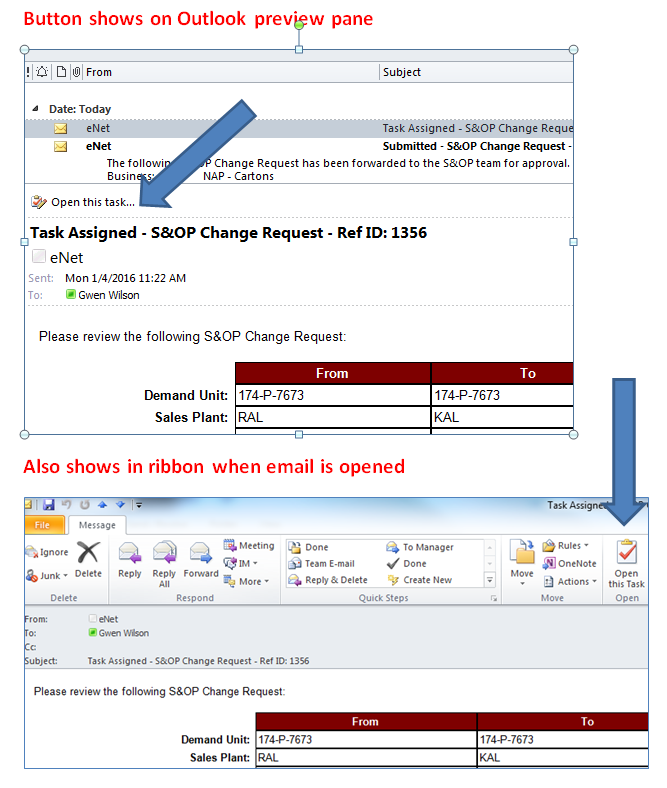
Thanks! I searched online, and could find documentation regarding issues with the button not working correctly (and possible solutions), but I couldn't find anything about not showing the buttons. I think you know what I'm referring to, but putting in a screenshot of outlook (I had worked up the screenshot before I saw your reply, and hadn't had a chance to upload it yet :) ).
The emails are html pages that I created and the pasted the code into the string builder and added the lookups for the fields... here is an example...do you think it could be something in the automatically generated (I didn't build LOL) header... like something in the Doc ID code?
<html xmlns:mso="urn:schemas-microsoft-com:office:office" xmlns:msdt="uuid:C2F41010-65B3-11d1-A29F-00AA00C14882" xmlns:v="urn:schemas-microsoft-com:vml"><head><style type="text/css">.style5 {font-size: small;}.style9 {font-size: x-small;}.style15 {margin-top: 0;margin-bottom: 0;} .style24 { border: 0 solid #FFFFFF;}.style25 {border-color: #000000; border-width: 1px; text-align: center; color: #FFFFFF; background-color: #7E0000;}.style26 { border-color: #000000; border-width: 1px;}.style27 { font-family: Arial, Helvetica, sans-serif; font-size: x-small;}.style28 { font-family: Arial, Helvetica, sans-serif; font-size: x-small; text-align: right;}</style>
<!--[if gte mso 9]><xml>
<mso:CustomDocumentProperties>
<mso:_dlc_DocId msdt:dt="string">RYVJ7D3S3MQD-3-111</mso:_dlc_DocId>
<mso:_dlc_DocIdItemGuid msdt:dt="string">a9d97481-52ed-4a32-b023-d0298e4c93f6</mso:_dlc_DocIdItemGuid>
<mso:_dlc_DocIdUrl msdt:dt="string">http://enetdev/sites/Athena/_layouts/DocIdRedir.aspx?ID=RYVJ7D3S3MQD-3-111, RYVJ7D3S3MQD-3-111</mso:_dlc_DocIdUrl>
</mso:CustomDocumentProperties>
</xml><![endif]-->
</head><body style="font-size: xx-small"><table dir="ltr" cellspacing="0"><tr ><td style="font-family: Arial; font-size: x-small" ><p style="margin-top: 1px; margin-bottom: 1px" class="style5"><span class="style9">Please review the following S&OP Change Request
(if all values in "To" are blank, then this is an Inactivation Request):</span><strong> </strong></p></td></tr></table><p style="margin-top: 1px; margin-bottom: 1px"> </p><table style="font-family: Arial; font-size: x-small; text-align: left; width: 50%;" cellpadding="2" cellspacing="1"><tr><td style="text-align: right; font-weight: 700; width: 30%;" class="style24" valign="top"> </td> <td style="border-style: solid; width: 30%;" class="style25" valign="top"><strong>From</strong></td><td style="border-style: solid; width: 30%;" class="style25" valign="top"><strong>To</strong></td></tr><tr><td style="text-align: right; font-weight: 700; width: 30%;" class="style24" valign="top">Demand Unit: </td><td style="border-style: solid; width: 30%;" class="style26" valign="top">[*****Old Demand Unit*****]</td><td style="border-style: solid; width: 30%;" class="style26" valign="top">[*****New Demand Unit*****]</td></tr><tr><td style="text-align: right; font-weight: 700; width: 30%;" class="style24" valign="top">Sales Plant: </td><td style="border-style: solid; width: 30%;" class="style26" valign="top">[*****Old Plant Desc*****]</td><td style="border-style: solid; width: 30%;" class="style26" valign="top">[*****New Plant Desc*****]</td></tr><tr><td style="text-align: right; font-weight: 700; width: 30%;" class="style24" valign="top">Demand Family: </td><td style="border-style: solid; width: 30%;" class="style26" valign="top">[*****Old Demand Family*****]</td><td style="border-style: solid; width: 30%;" class="style26" valign="top">[*****New Demand Family*****]</td></tr><tr><td style="text-align: right; font-weight: 700; width: 30%;" class="style24" valign="top">Sold To: </td><td style="border-style: solid; width: 30%;" class="style26" valign="top">[*****Old Sold To ID*****]</td><td style="border-style: solid; width: 30%;" class="style26" valign="top">[*****New Sold To ID*****]</td></tr><tr><td style="text-align: right; font-weight: 700; width: 30%;" class="style24" valign="top">Business Line: </td><td style="border-style: solid; width: 30%;" class="style26" valign="top">[*****Old BusinessLine*****]</td><td style="border-style: solid; width: 30%;" class="style26" valign="top">[*****New BusinessLine*****]</td></tr><tr><td style="text-align: right; font-weight: 700; width: 30%;" class="style24" valign="top">Ship To: </td><td style="border-style: solid; width: 30%;" class="style26" valign="top">[*****Old Ship To ID*****]</td><td style="border-style: solid; width: 30%;" class="style26" valign="top">[*****New Ship To ID*****]</td></tr></table><p class="style15"> </p><table style="width: 50%"><tr><td style="width: 30%" class="style28"><strong>Sumitted By: </strong></td><td class="style27" style="width: 60%">[*****Submitter*****] on [*****Submit Date*****]</td></tr><tr><td style="width: 30%" class="style28"><strong>Reference ID: </strong></td><td class="style27" style="width: 60%">[****** Original List ID******]</td></tr><tr><td style="width: 30%" class="style28" valign="top"><strong>Comments: </strong></td><td class="style27" style="width: 60%">[*****Submitter Comments*****]</td></tr></table><br>