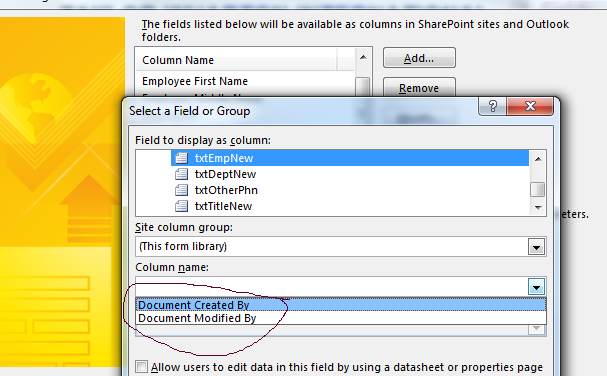
I am having a Form Library called Employee Form Library. It has Emp Name, Emp Dept etc (all fields related to employee personal and official details). I created an infopath with 2 views. View A and View B. When new employee joins HR opens Employee Form Lib, and fills infopath form with View A. HR fills all details like Emp name, Emp Dept etc etc. and Submits the form to Form Library. All the data is saved in respective fields in form library.
Now if employee changes his details (like last name, department etc), HR again opens that employee's form and View B opens. I am able to achieve this also. On View B , I have 2 text box for each details, like Existing Name ---- Changed Name; Existing Department---- Changed Department and so on. I am able to capture all the exisitng information on View B also. When HR opens View B , he fills the changes name, department etc and hits SUBMIT button. Now this submit button is creating nightmare for me. For my second submit button, i have created a separate data connection. But when I PUBLISH the form, I am unable to map the new employee name to my existing employee name in Form Library. I am unable to map new department to existing field department in Form Library.I have attached a screen shot for better understanding. In the circled dropdown , I am nit getting Employee Name field of Form Library,,, so that I can map my new employee name with it.
Please suggest...