Disable Button Based on Field Values in a Repeating Group - InfoPath Dev
in

InfoPath Dev

Disable Button Based on Field Values in a Repeating Group

Last post 02-25-2015 07:25 AM by GwenW. 4 replies.
Page 1 of 1 (5 items)
Sort Posts: Previous Next
  • 02-24-2015 03:56 PM

    Disable Button Based on Field Values in a Repeating Group

    Hi,

    In a Browser Form - I have a repeating group in an InfoPath form containing various fields. I have a Submit button (I created, not an IP form submit button) that uses a map and "submits" data to a list (the form itself is never saved or submitted to SharePoint). I need to disable the submit button if all three specific fields in the repeating group are not filled in (at least one of the 3 must  be populated). This is easy enough in a non-repeating group (if field1 is blank and field2 is blank and field3 is blank then disable the button). However, this doesn't work using the fields in the repeating group. It seems like if there is only one row, it works. But when you insert another item (row), the logic breaks). Is this doable... maybe with qRules?

    SharePoint 2010 - InfoPath 2010 - qRules 6.1

    Thanks for any help!


  • 02-24-2015 06:01 PM In reply to

    Re: Disable Button Based on Field Values in a Repeating Group

    I've attached a sample. Save it locally, right click and select design to open in design mode - then you can preview. I added a screenshot to the form to show you where I selected "any occurrence" for the various fields, as that is tricksy and hidden.

    Hilary Stoupa

  • 02-24-2015 06:37 PM In reply to

    Re: Disable Button Based on Field Values in a Repeating Group

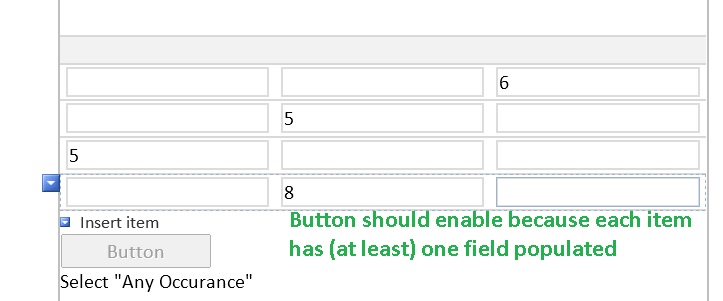
    Hi Hilary, thanks for your help. The form doesn't quite do what I need. I changed the "or" to "and" on the rule conditions, and that got me closer. The first row works. I put a value in one field, the button enables. However, when I insert an item and put a value in a different field, the button doesn't enable (however if I put it in the same field, the button does enable). The user needs to be able to pick any one of the three on each item... as long as at least one is populated on each item, then the button should enable.

    I attached a screenshot to help show the task at hand.

    Thanks!

  • 02-25-2015 07:18 AM In reply to

    Re: Disable Button Based on Field Values in a Repeating Group

    Oh, I understand now - you can use a custom expression like this:

    count(my:group1/my:group2[my:field1 = "" and my:field2 = "" and my:field3 = ""]) != 0

    Just change the first drop down to "the expression" in the condition, and paste that in - see if that does what you want.

    Hilary Stoupa

  • 02-25-2015 07:25 AM In reply to

    Re: Disable Button Based on Field Values in a Repeating Group

    This worked perfectly! Thank you so much :)

Page 1 of 1 (5 items)
Copyright © 2003-2019 Qdabra Software. All rights reserved.
View our Terms of Use.